📊 Plot Scripts
The plotting module contains Python scripts for visualizing data generated by GPUMD, NEP, and GPUMDkit calculators. All plots can be displayed interactively or saved as high-resolution PNG files.
Script Location: Scripts/plt_scripts/
Quick Access
gpumdkit.sh -plt              # Show all plotting options
gpumdkit.sh -plt <type>       # Generate a plot
gpumdkit.sh -plt <type> save  # Save plot as PNG
gpumdkit.sh -plt -h           # List available plot types
Click-to-run actions in the web console
Run gpumdkit.sh -server and open a working directory in the browser. The
console offers a plot action only when its expected input files are present;
it invokes the corresponding gpumdkit.sh -plt ... save command in that
directory. In addition to the existing actions, it recognizes:
| Inputs in the current directory | Available action |
|---|---|
force_train.out |
Force errors |
rdf.out |
RDF |
xrd.out |
XRD |
At least two <integer>K/xrd.out files |
XRD comparison by temperature |
cohesive.out |
Cohesive energy |
viscosity.out |
Viscosity |
phonon_NEP.dat and QPOINTS |
Phonon band structure |
Plots that need a user-selected element, temperature, input-file set, or other scientific parameter remain available from the terminal, where those choices can be entered explicitly.
See Remote Web Console for directory navigation and file management.
A reliable plotting workflow
Use gpumdkit.sh -plt -h to list plot types; follow each section’s command signature and save argument position.
| If you have... | Start with... | What to inspect first |
|---|---|---|
loss.out, energy_train.out, and force_train.out |
gpumdkit.sh -plt train |
loss trend and energy/force parity |
energy_train.out and force_train.out from prediction mode |
gpumdkit.sh -plt prediction |
parity results for structures in train.xyz |
thermo.out |
gpumdkit.sh -plt thermo |
equilibration and thermodynamic evolution |
four-column msd.out from gpumdkit.sh -calc msd |
gpumdkit.sh -plt msd |
diffusion regime before interpreting a fit |
single-group seven-column msd.out from GPUMD compute_msd |
gpumdkit.sh -plt sdc or gpumdkit.sh -plt msd_sdc |
SDC columns and diffusion regime |
sdc.out from GPUMD compute_sdc |
gpumdkit.sh -plt vac |
velocity autocorrelation |
rdf.out |
gpumdkit.sh -plt rdf |
all available RDF value columns |
xrd.out |
gpumdkit.sh -plt xrd |
XRD intensity curve |
compute_msd output for multiple groups appends additional group data. Inspect
the grouping layout and use msd_all where appropriate instead of assuming
that every msd.out has seven columns.
For example, a saved training plot is requested as:
Show the full plotting command menu
Running gpumdkit.sh -plt prints the plotting command menu:
+-----------------------------------------------------------------------------------------------+
|                     GPUMDkit <version> PLOT & VISUALIZATION TOOLS              |
+-----------------------------------------------------------------------------------------------+
|  Usage: gpumdkit.sh -plt <type>                        List: gpumdkit.sh -plt -h              |
+-----------------------------------------------------------------------------------------------+
|                                    NEP Training & Evaluation                                  |
+-----------------------------------------------------------------------------------------------+
|  train          - NEP training results           prediction     - NEP prediction results      |
|  train_test     - NEP train and test results     parity_density - Parity density plot         |
|  train_density  - Training results density plot  restart        - Parameters in nep.restart   |
|  charge         - Charge distribution            born_charge    - Born effective charges      |
|  dimer          - Dimer energy/force curve       force_errors   - Force errors                |
|  des            - Descriptors                    net_force      - Net force distribution      |
+-----------------------------------------------------------------------------------------------+
|                                     Diffusion & Transport                                     |
+-----------------------------------------------------------------------------------------------+
|  msd            - Mean square displacement       msd_conv       - MSD convergence             |
|  msd_all        - MSD for all species            sdc            - Self diffusion coefficient  |
|  msd_sdc        - MSD and SDC together           sigma          - Arrhenius ionic conductivity|
|  D              - Arrhenius diffusivity          sigma_xyz      - Directional Arrhenius sigma |
|  D_xyz          - Directional Arrhenius D                                                     |
|  D_PT           - PT Arrhenius D                 sigma_PT       - PT Arrhenius sigma          |
|  doas           - Density of atomistic states                                                 |
+-----------------------------------------------------------------------------------------------+
|                                    MD & Structural Analysis                                   |
+-----------------------------------------------------------------------------------------------+
|  thermo         - thermo info in thermo.out      thermo2/3      - Thermo in different styles  |
|  rdf            - Radial distribution function   rdf_pmf        - Potential of mean force     |
|  vac            - Velocity autocorrelation       cohesive       - Cohesive energy curve       |
|  xrd            - X-ray diffraction              plane-grid     - Displacement plane grid     |
|  xrd_comp       - Compare XRD                                                                 |
+-----------------------------------------------------------------------------------------------+
|                                        Heat Transport                                         |
+-----------------------------------------------------------------------------------------------+
|  emd            - EMD results                    emd2           - EMD all directions          |
|  nemd           - NEMD results                   hnemd          - HNEMD results               |
|  viscosity      - Viscosity                                                                   |
+-----------------------------------------------------------------------------------------------+
|                                          Phonons                                              |
+-----------------------------------------------------------------------------------------------+
|  pdos           - VAC and PDOS                 phonon         - Phonon band structure         |
|  phonon_comp    - Compare phonon band structures                                              |
+-----------------------------------------------------------------------------------------------+
NEP Training and Prediction
The train, prediction, train_density, and parity_density plots also
print a terminal table containing R^2, MAE, and RMSE for energy, force, and
stress. If no valid stress rows are available, the stress entries are N/A.
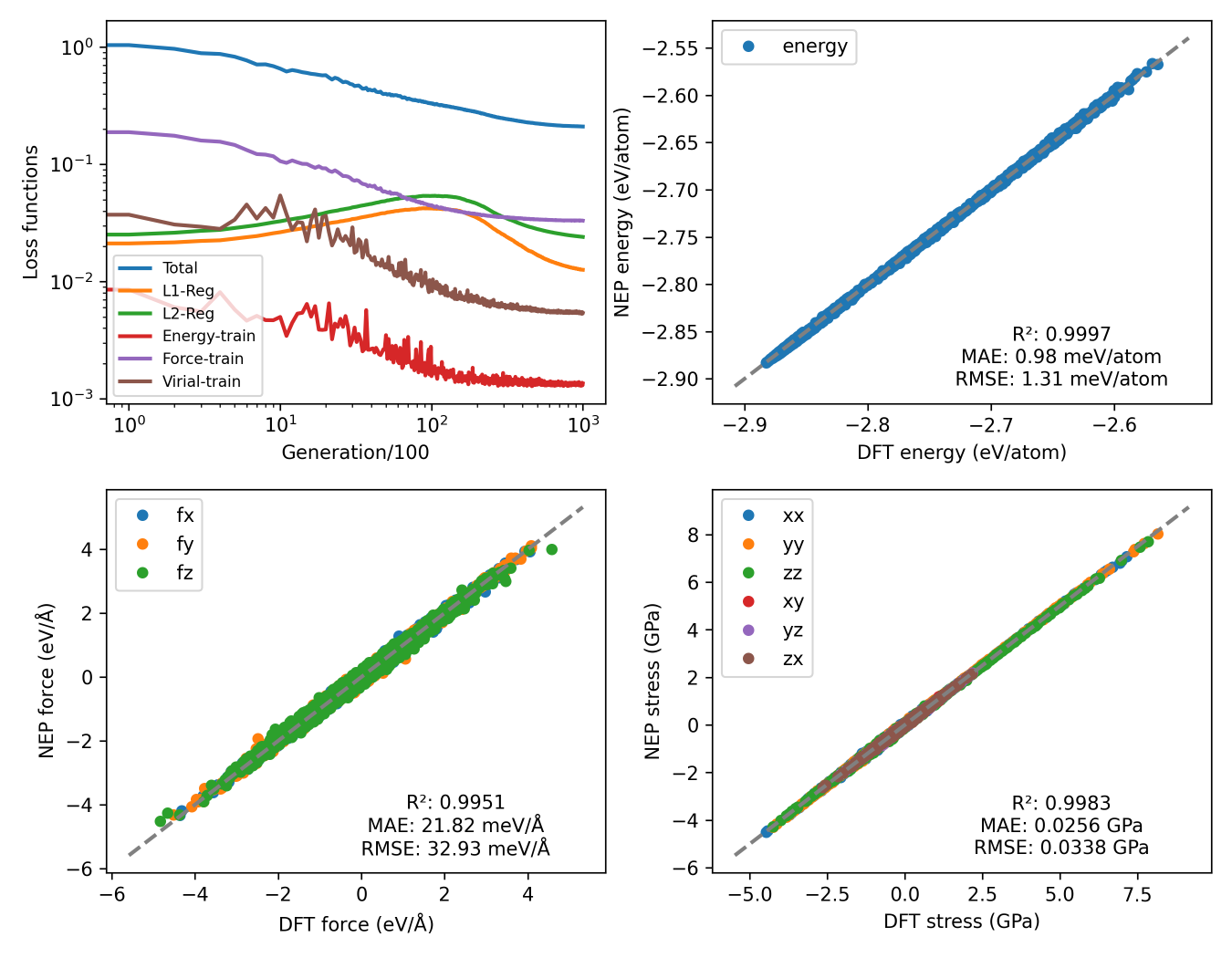
plt_train.py
Visualizes NEP training progress including loss curves, RMSE evolution, and parity plots comparing DFT vs NEP predictions for energy, forces, and stresses.
Input Files: loss.out, energy_train.out, force_train.out, and either
stress_train.out (preferred) or virial_train.out
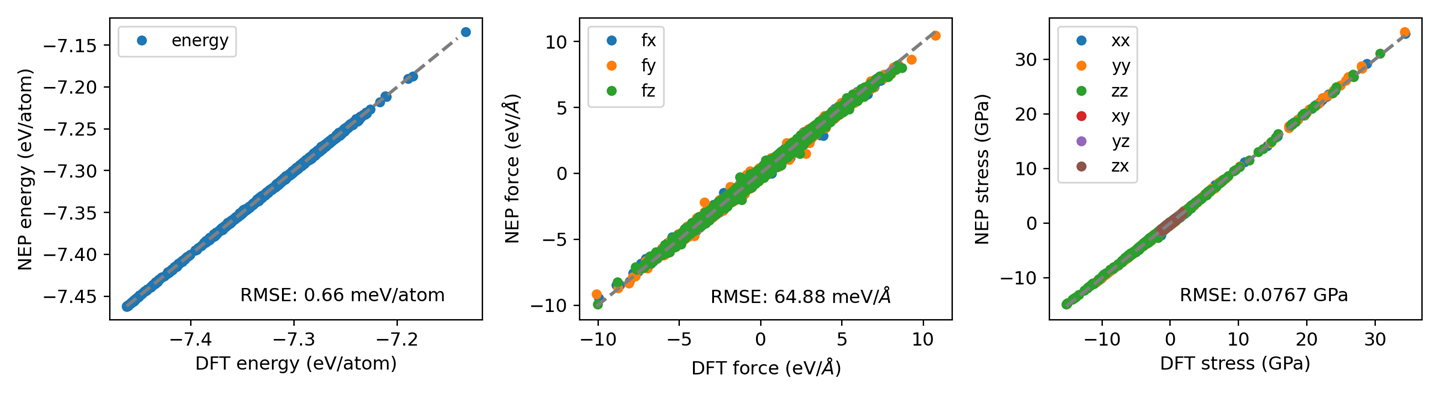
plt_prediction.py
Visualizes NEP prediction-mode results for the structures in train.xyz.
Prediction mode still writes the parity data to files ending in _train.out.
Input Files: energy_train.out, force_train.out, and either
stress_train.out (preferred when it contains valid rows) or virial_train.out
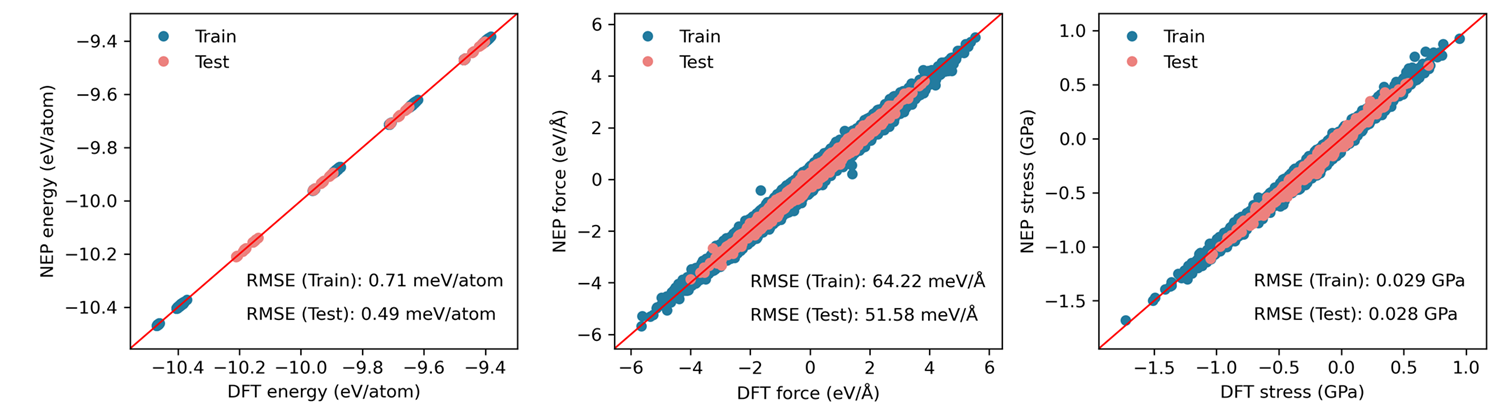
plt_train_test.py
Creates combined parity plots for both training and testing datasets.
Input Files: energy_train.out, force_train.out, stress_train.out,
energy_test.out, force_test.out, and stress_test.out
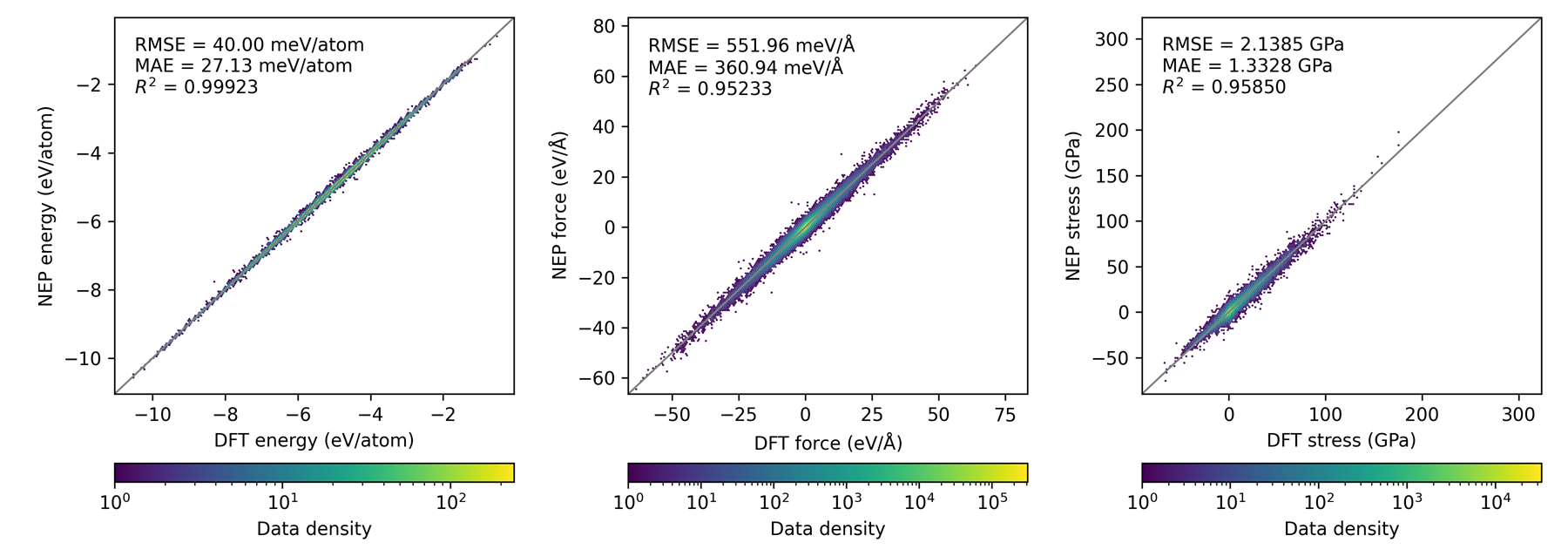
plt_parity_density.py
Generates density-based parity plots for energies, forces, and stresses. Useful for large datasets where scatter plots become unreadable.
Input Files: energy_train.out, force_train.out, and either
stress_train.out (preferred) or virial_train.out
plt_train_density.py
Generates density-based parity plots for NEP training results (energy, forces, stress or virial). Stress is preferred when both tensor files exist. Useful for large datasets where scatter plots become unreadable.
Input Files: energy_train.out, force_train.out, and either
stress_train.out (preferred) or virial_train.out
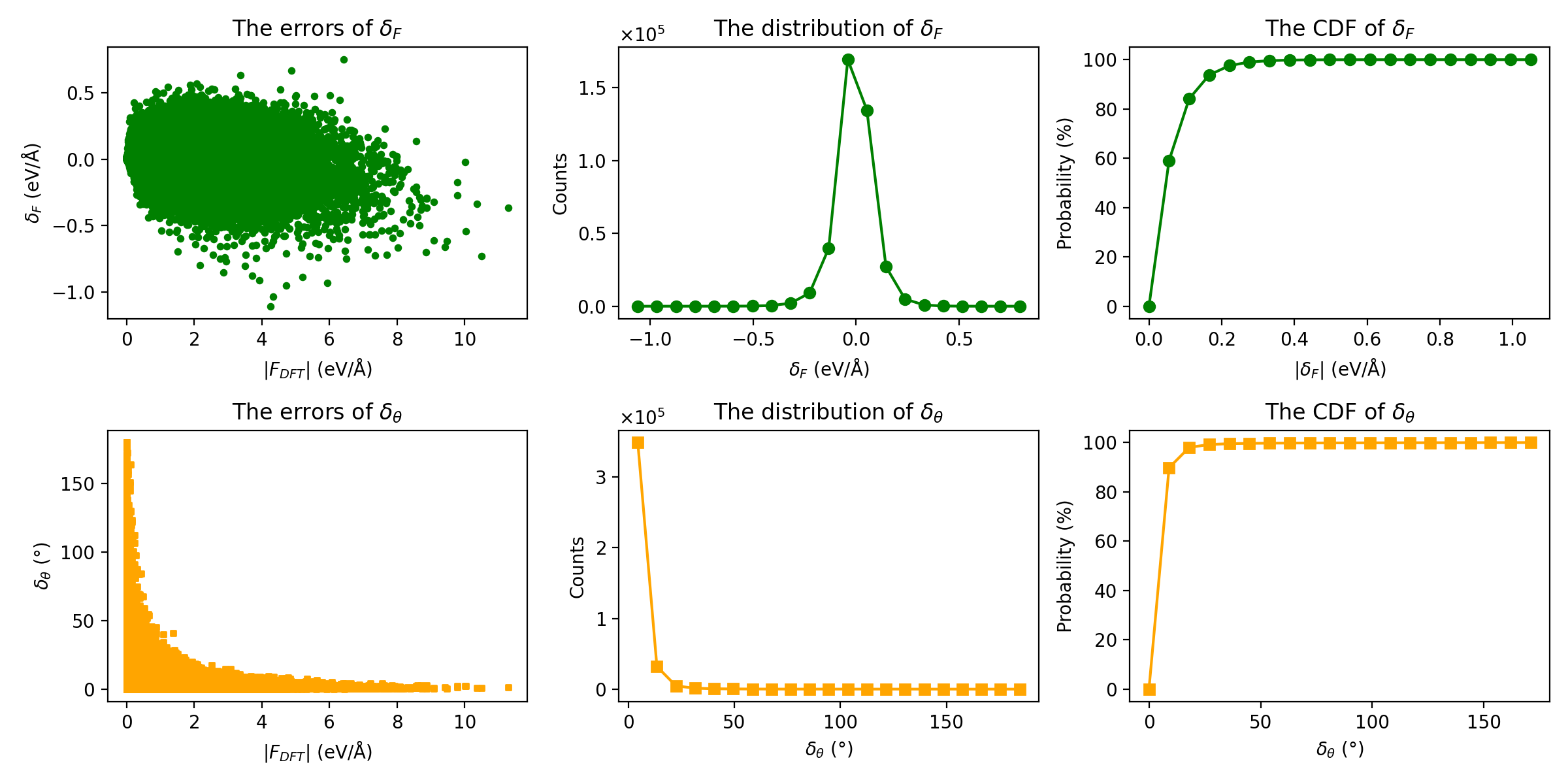
plt_force_errors.py
Plots force error evaluation metrics as proposed by Liu et al..
Input File: force_train.out
Metrics Displayed: - Force magnitude errors (delta_F) - Force angle errors (delta_theta) - Distribution of errors
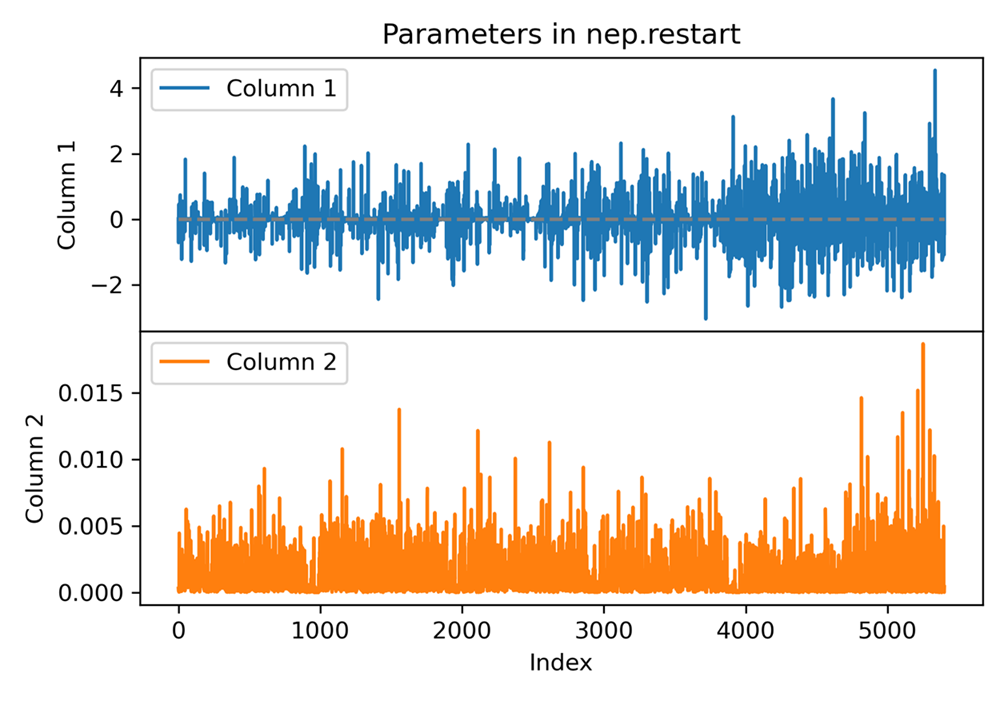
plt_nep_restart.py
Visualizes parameters stored in the nep.restart file.
Input File: nep.restart
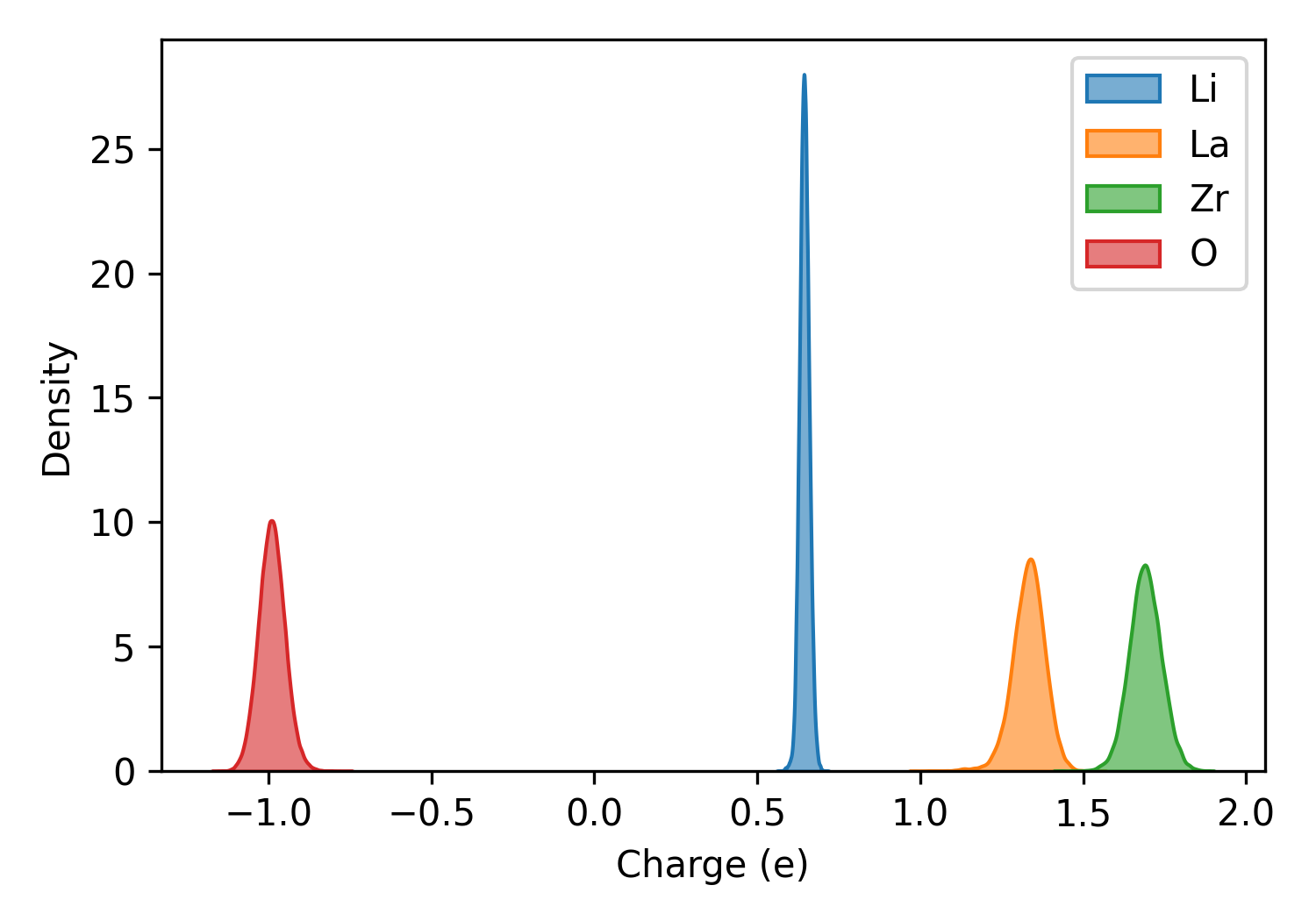
plt_charge.py
Plots charge distribution from qNEP model.
Input Files: train.xyz and charge_train.out
Important: Ensure consistency between training set and charge output atom ordering. Use full batch training or run prediction step first.
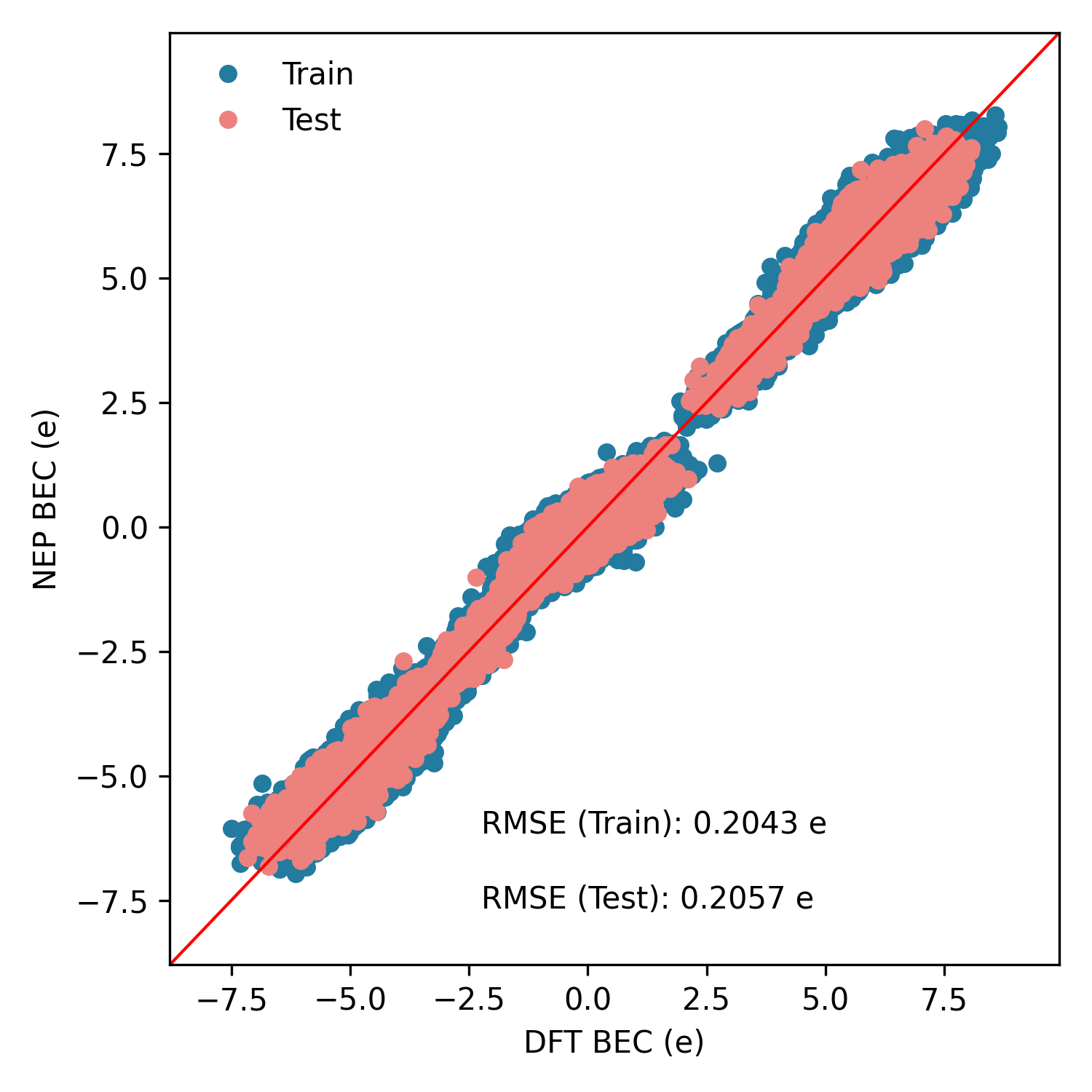
plt_born_charge.py
Creates parity plots for Born effective charges (BEC) on training and testing datasets. Structures with all-zero reference BEC are filtered out.
Input Files: bec_train.out; optional bec_test.out
Thermodynamic Properties
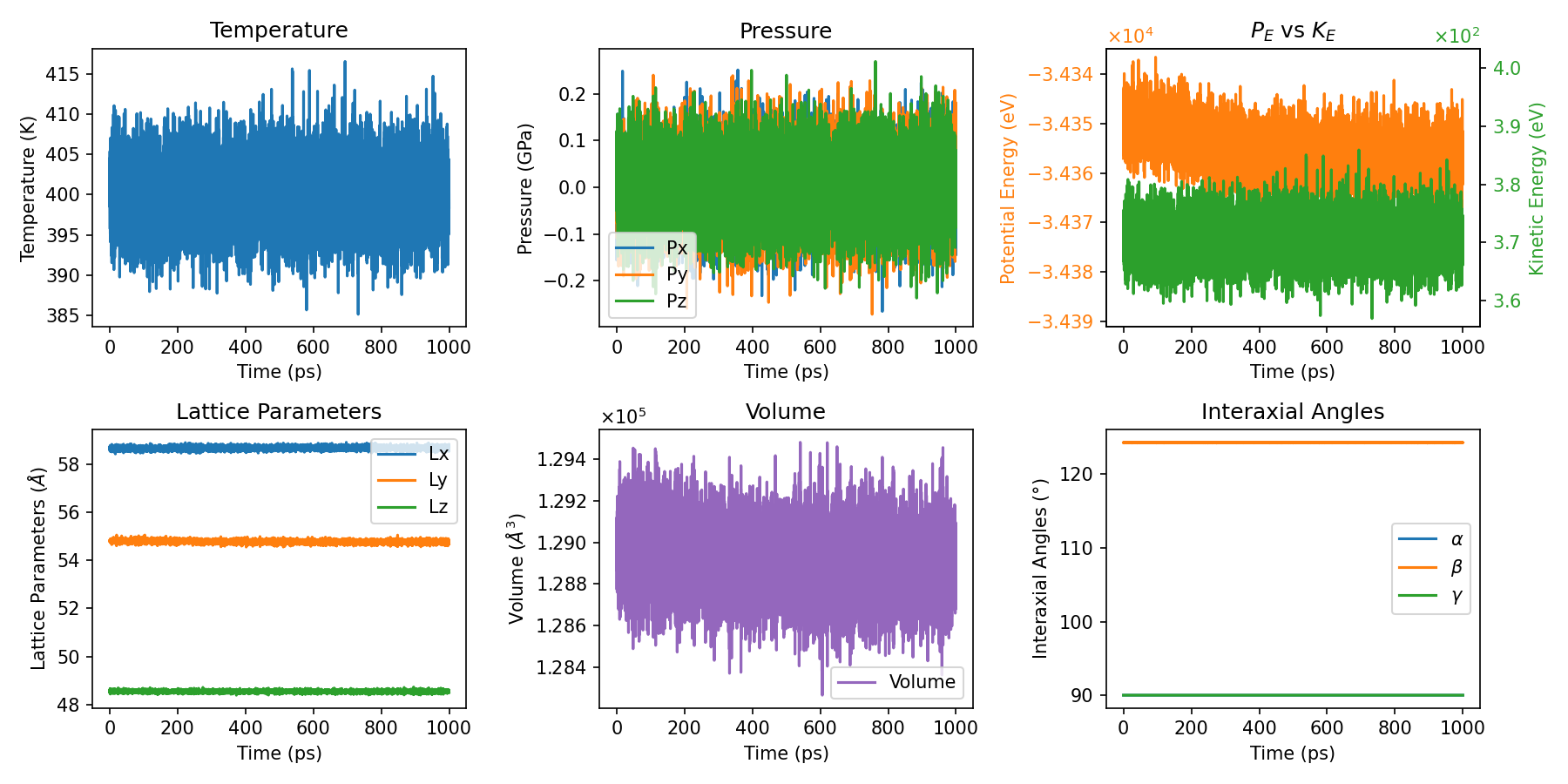
plt_thermo.py
Primary script for comprehensive thermodynamic property visualization.
Input File: thermo.out
plt_thermo2.py & plt_thermo3.py
Alternative thermodynamic visualization with different styles.
Input File: thermo.out
Diffusion and Ionic Transport
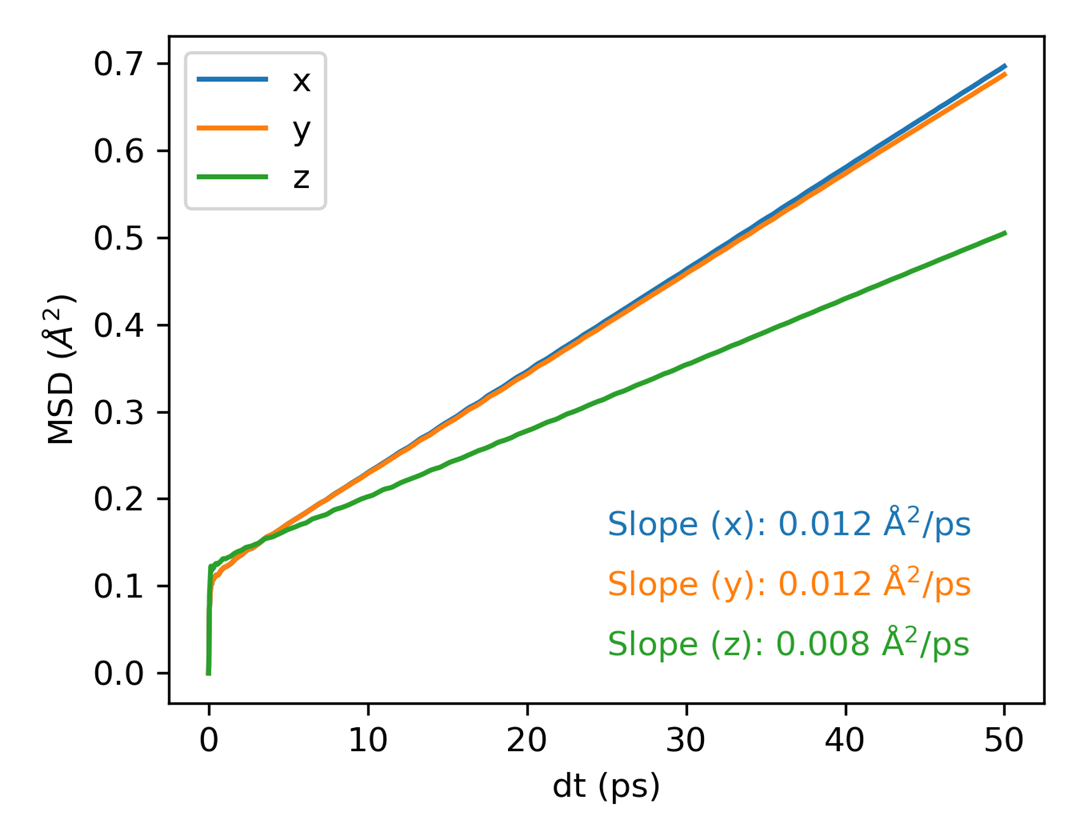
plt_msd.py
Plots mean square displacement (MSD) for all directions.
Input File: msd.out with time and MSD_x/y/z in its first four columns.
This accepts the four-column output from gpumdkit.sh -calc msd and the first
four columns of GPUMD compute_msd output.
The slope annotations use the middle 40%-80% of the MSD series.
plt_msd_all.py
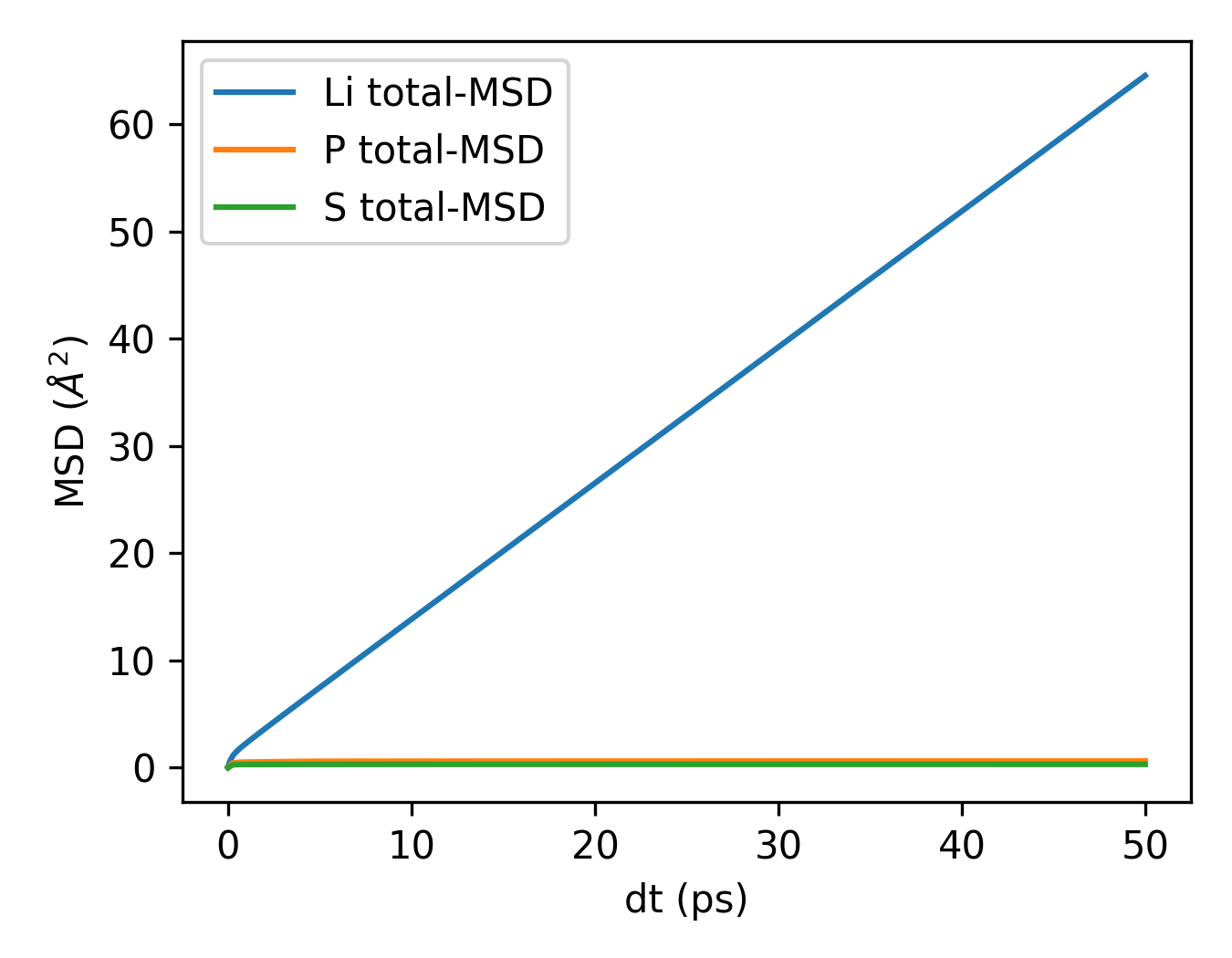
Plots MSD for all atomic species separately when using all_groups in GPUMD.
Input File: msd.out (computed with all_groups option)
Requirements: Must use all_groups in the compute_msd command in run.in.
For multiple groups, GPUMD appends group data; inspect that layout rather than
assuming the file has the seven columns of a single-group result.
plt_msd_convergence_check.py
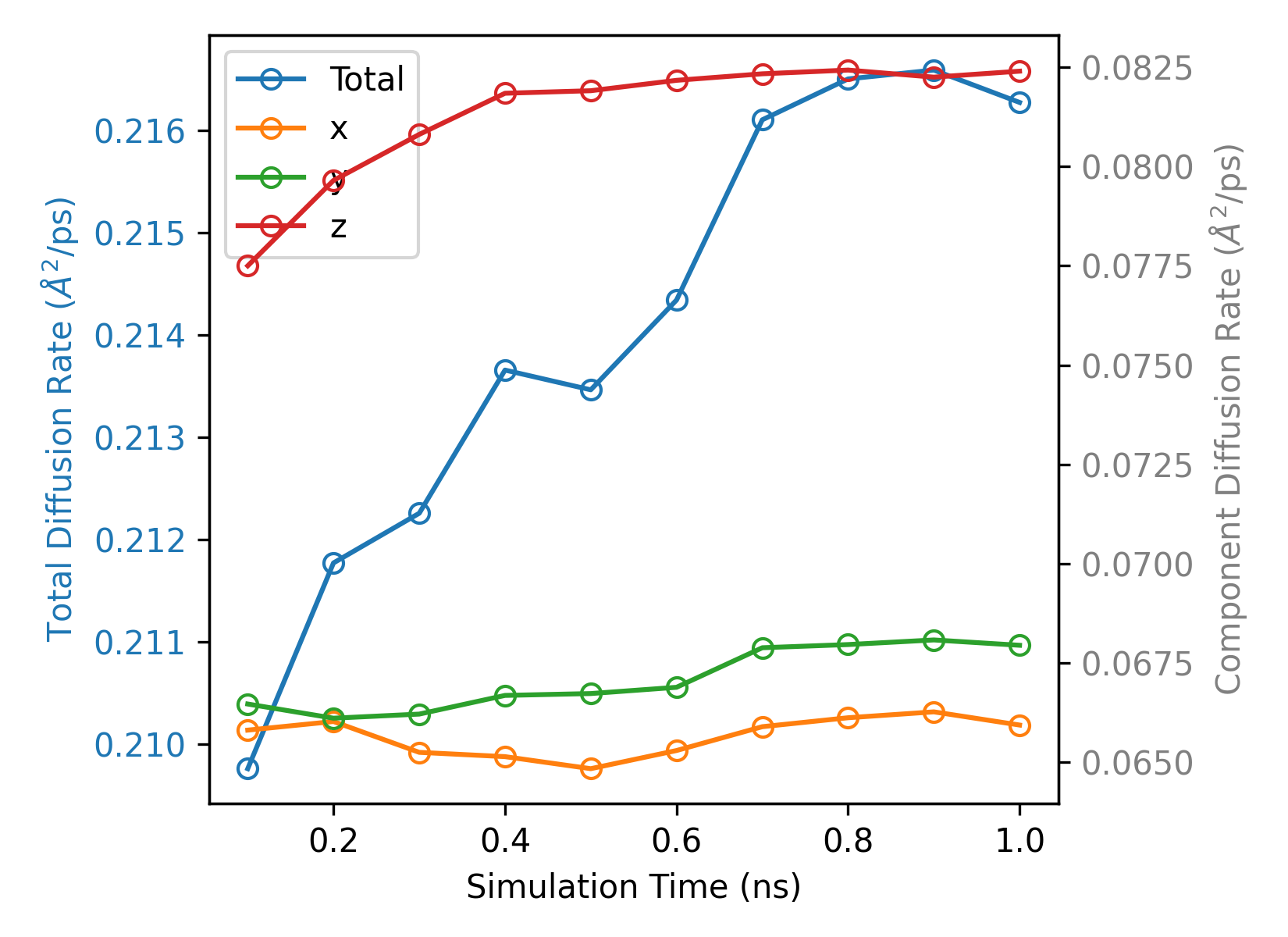
Checks convergence of MSD calculations across different time windows.
Input File: msd_step*.out (computed with save_every option)
Requirements: Use save_every in the compute_msd command.
Purpose: Verify MSD has converged sufficiently for accurate diffusion coefficient calculation.
plt_sdc.py
Plots self-diffusion coefficient (SDC) vs time.
Input File: a single-group seven-column msd.out from GPUMD compute_msd:
time, MSD_x/y/z, and SDC_x/y/z. The four-column file from -calc msd is
not sufficient for this plot.
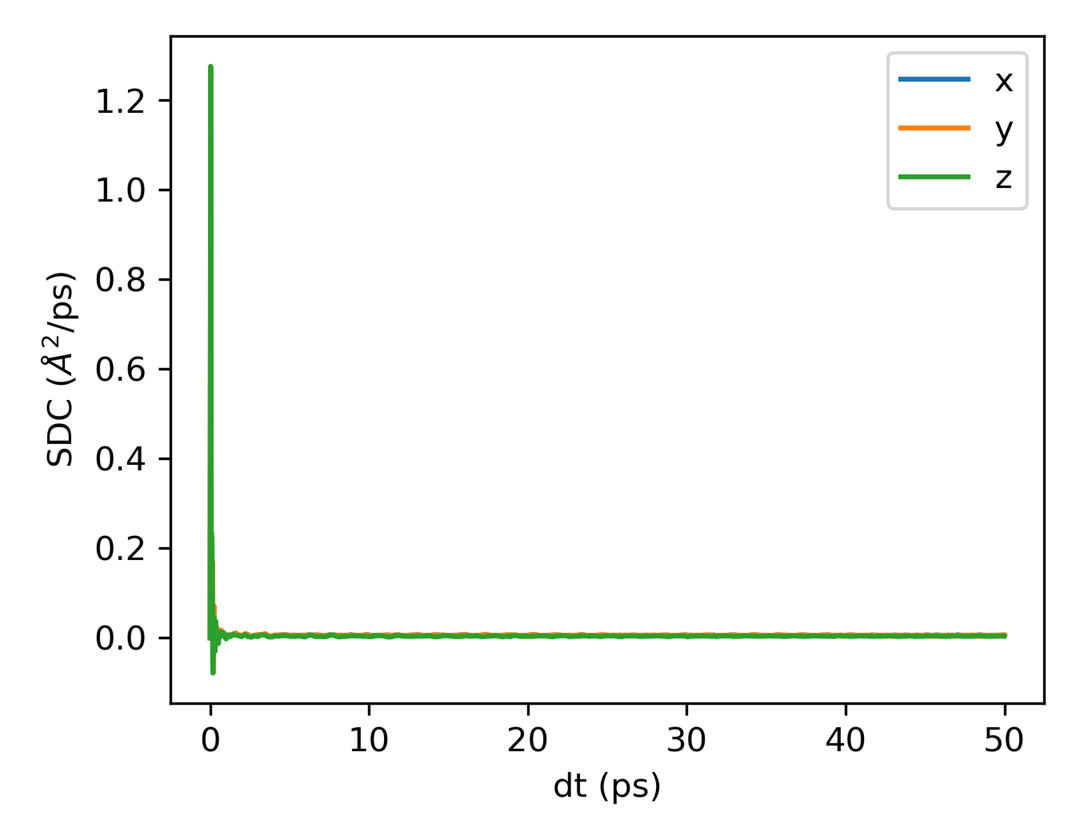
plt_msd_sdc.py
Plots MSD and self-diffusion coefficient (SDC) side by side. The slope annotations use the middle 40%-80% of the MSD series; the inset shows the last 80% of the SDC data with a moving-average overlay.
Input File: a single-group seven-column msd.out from GPUMD compute_msd:
time, MSD_x/y/z, and SDC_x/y/z. The four-column file from -calc msd is
not sufficient for this plot.
plt_arrhenius_d.py
Creates Arrhenius plot for diffusivity (log10 D vs 1000/T).
Input Files: *K/msd.out files (each temperature subdirectory should contain an msd.out)
Activation-energy output format:
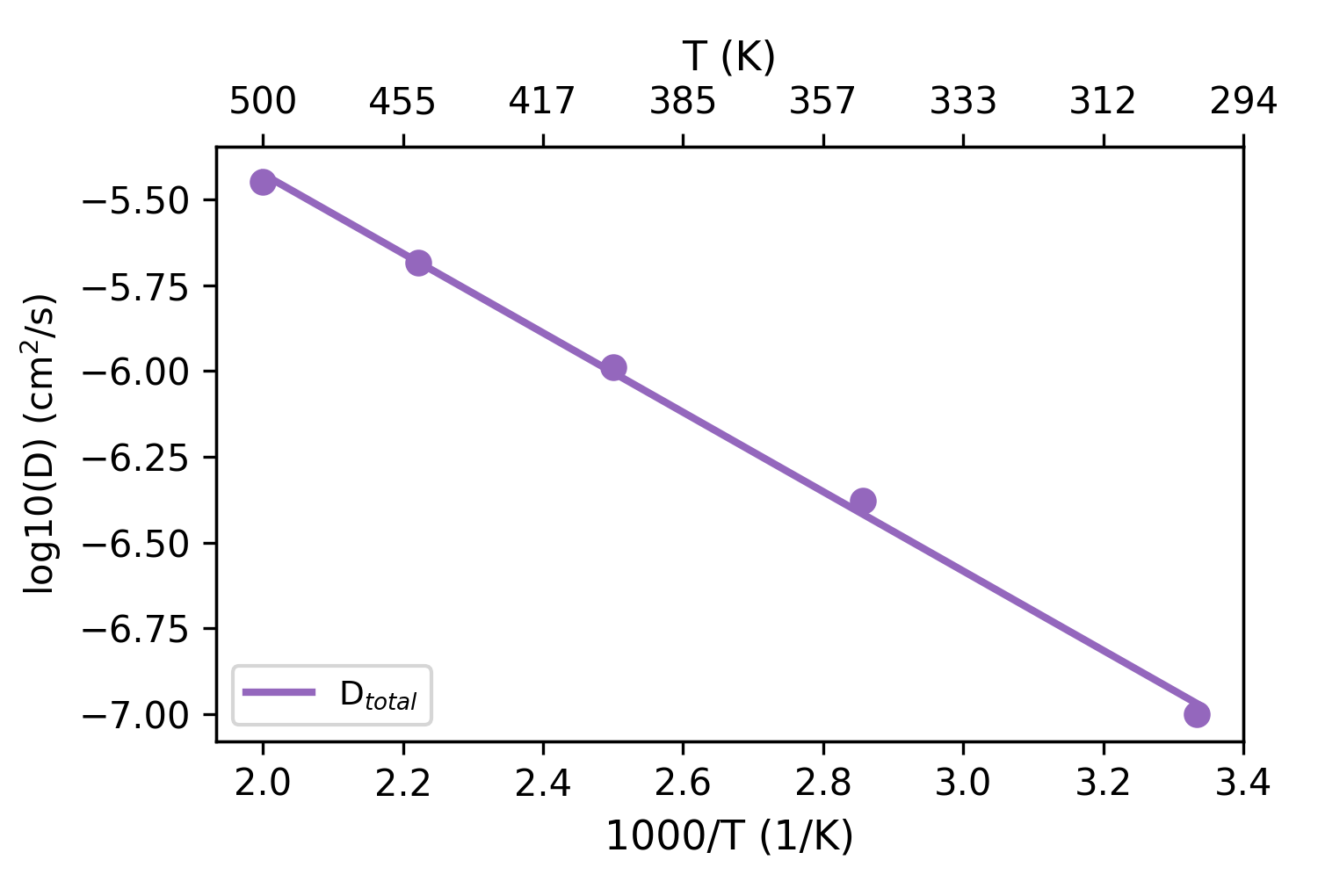
plt_arrhenius_d_PT.py
Creates a piecewise Arrhenius diffusivity plot around a user-specified phase-transition temperature.
The transition-temperature point is included in both the LowT (T <= Tc) and HighT (T >= Tc) fits.
Input Files: *K/msd.out files
The legend reports the activation energy of each branch as HighT (xx eV) and LowT (xx eV).

plt_arrhenius_d_xyz.py
Calculates diffusion coefficients from msd.out in temperature folders for the
x/y/z directions, generates a directional Arrhenius plot, and extracts the
activation energy of each component.
Input Files: *K/msd.out files
These conductivity plots use the first temperature's model.xyz to count Li
and Na together, assume unit charge, and apply the same ion count and replication
across temperatures. Use them for one mobile Li or Na species with matching MSD
columns; other species, mixed carriers, or changing composition require a separate
calculation. They fit the 40%–80% MSD interval and extrapolate conductivity to
300 K using the Nernst–Einstein relation. Validate the diffusive interval and the
extrapolation range before interpreting the results.
plt_arrhenius_sigma.py
Creates Arrhenius plot for ionic conductivity (log10(σ·T) vs 1000/T).
Input Files: thermo.out and msd.out in each *K/ directory;
model.xyz and optional run.in in the first temperature directory
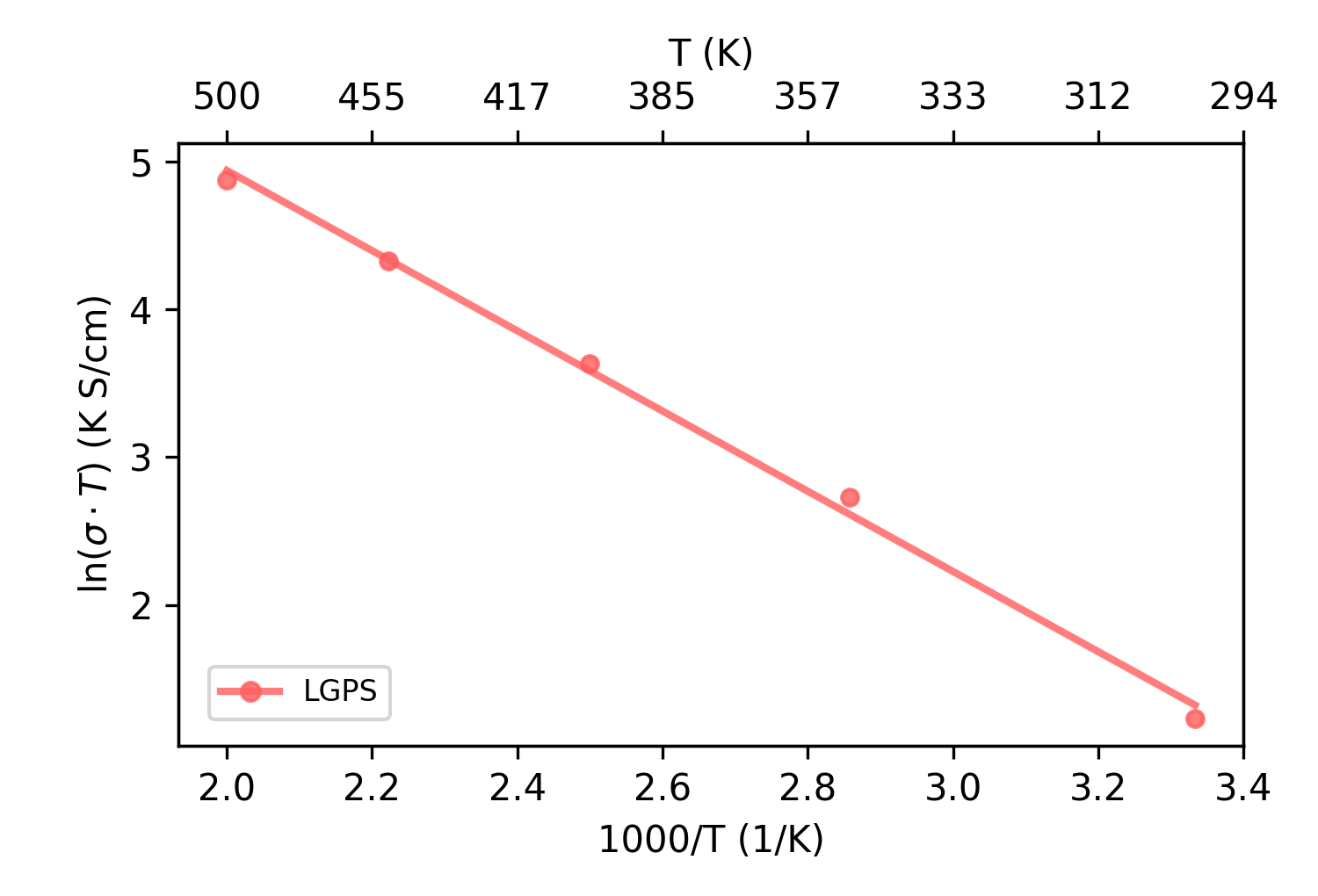
plt_arrhenius_sigma_PT.py
Creates a piecewise Arrhenius ionic-conductivity plot around a user-specified phase-transition temperature.
The transition-temperature point is included in both the LowT (T <= Tc) and HighT (T >= Tc) fits.
The 300 K conductivity is extrapolated from the branch on the same side of the transition as 300 K.
Input Files: thermo.out and msd.out in each *K/ directory;
model.xyz and optional run.in in the first temperature directory
The legend reports the activation energy of each branch as HighT (xx eV) and LowT (xx eV).

plt_arrhenius_sigma_xyz.py
Calculates the ionic conductivity from MSD and thermo data in temperature folders for the x/y/z directions, plots the directional Arrhenius relationship, and extracts the activation energy of each direction using the Nernst-Einstein relation.
Input Files: thermo.out and msd.out in each *K/ directory;
model.xyz in the first temperature directory
Heat Transport
plt_emd.py
Analyzes and plots thermal conductivity from equilibrium molecular dynamics (EMD).
Input Files: EMD output files from GPUMD
gpumdkit.sh -plt emd x --save-data        # export processed data
gpumdkit.sh -plt emd x --save --save-data # save the figure and data
--save saves the figure as emd.png. --save-data saves the processed
arrays as data_emd.npz and tab-separated data_emd.txt; the two options are
independent. The legacy bare tokens save and save_data remain accepted.
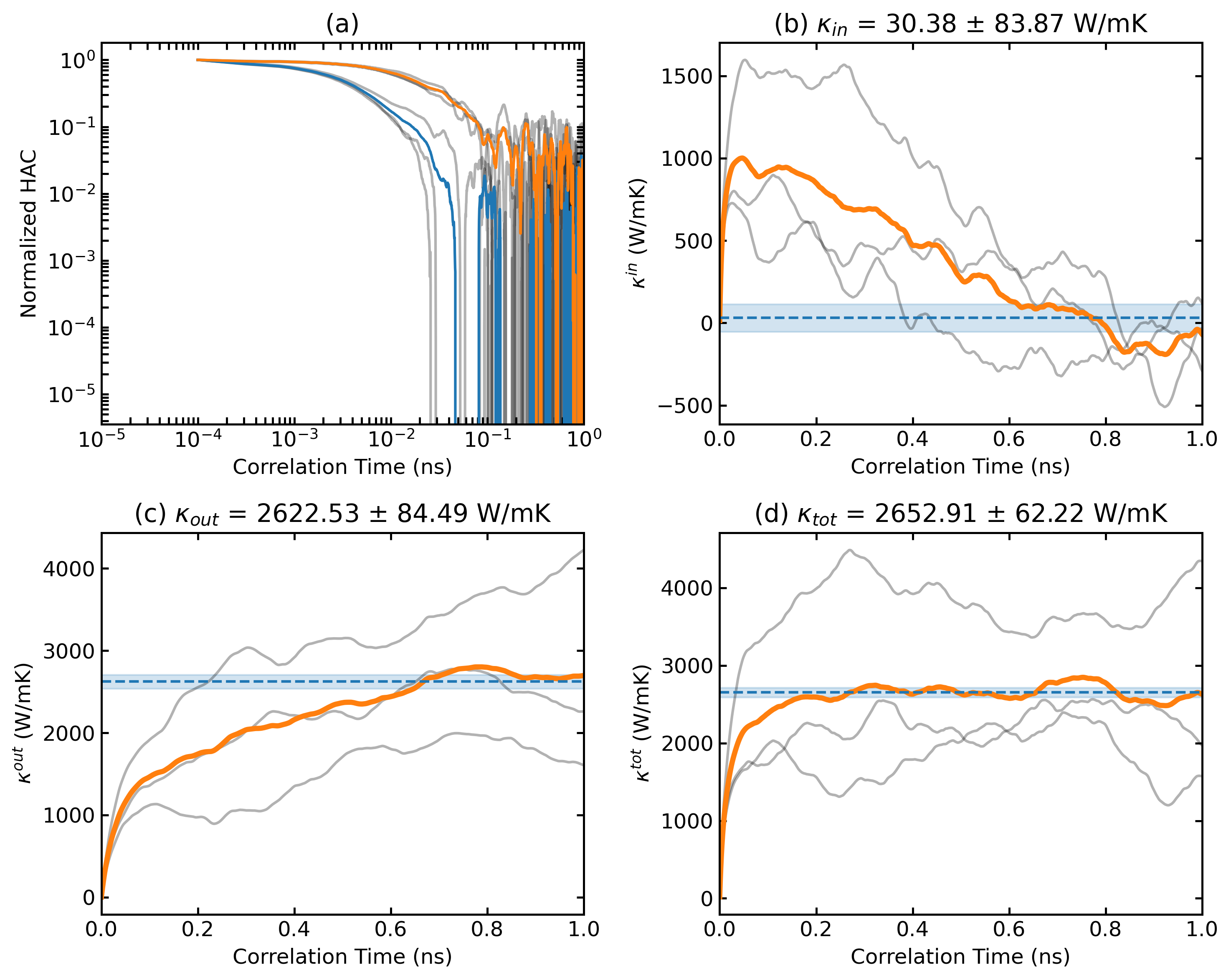
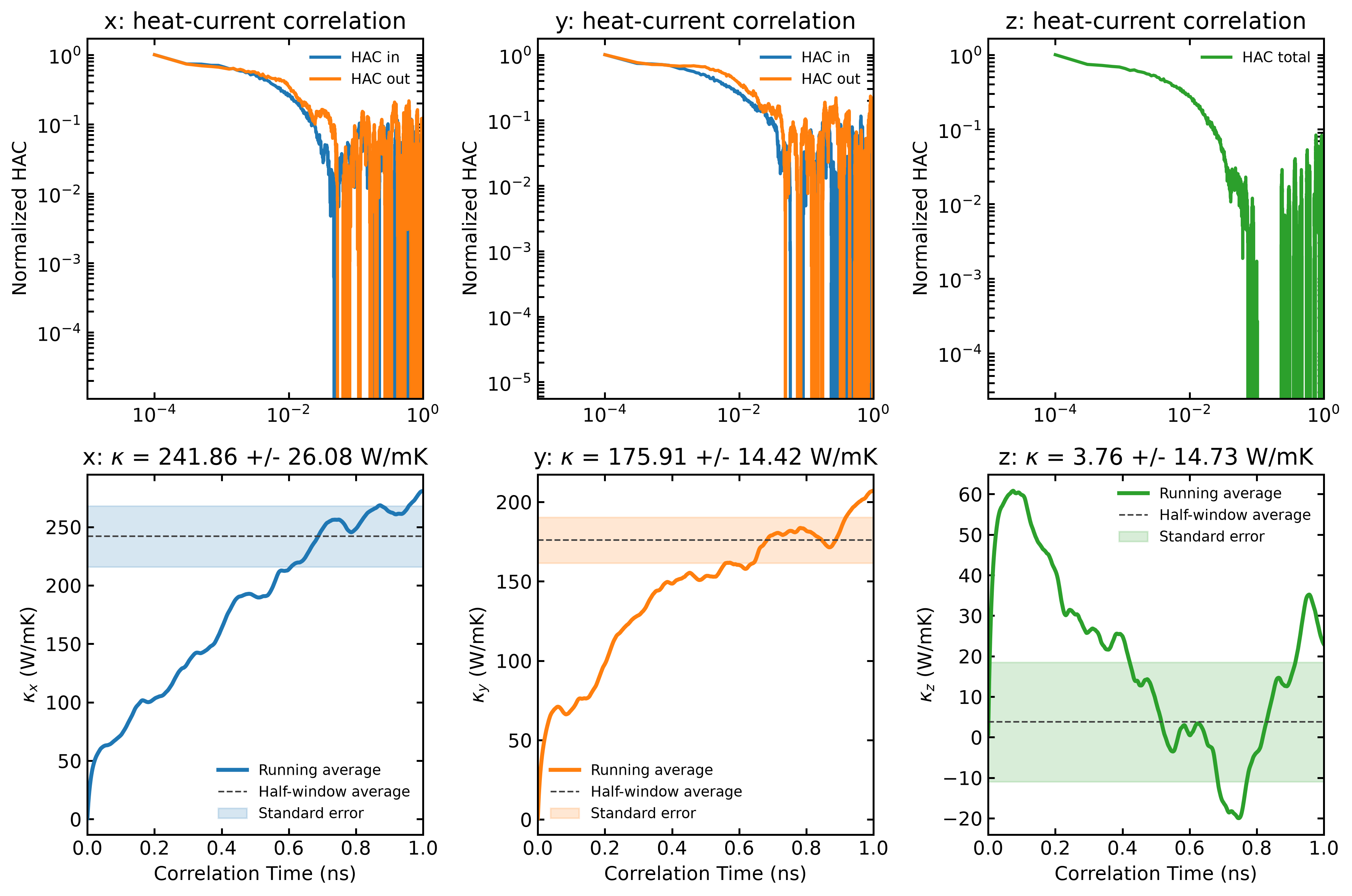
plt_emd2.py
Plots heat-current correlation and total EMD thermal conductivity in the x, y,
and z directions in one figure. It uses the same run.in and hac.out files
and averaging rule as plt_emd.py.
Input Files: EMD output files from GPUMD
gpumdkit.sh -plt emd2             # Display all directional results
gpumdkit.sh -plt emd2 save        # Save as emd2.png
The HAC panels use a logarithmic correlation-time axis and retain the signed HAC values on the y-axis. A physically zero direction is shown as a zero curve. The reported uncertainty follows the legacy half-window spread divided by the square root of the number of HAC repeats; it is not an independent- trajectory standard error.
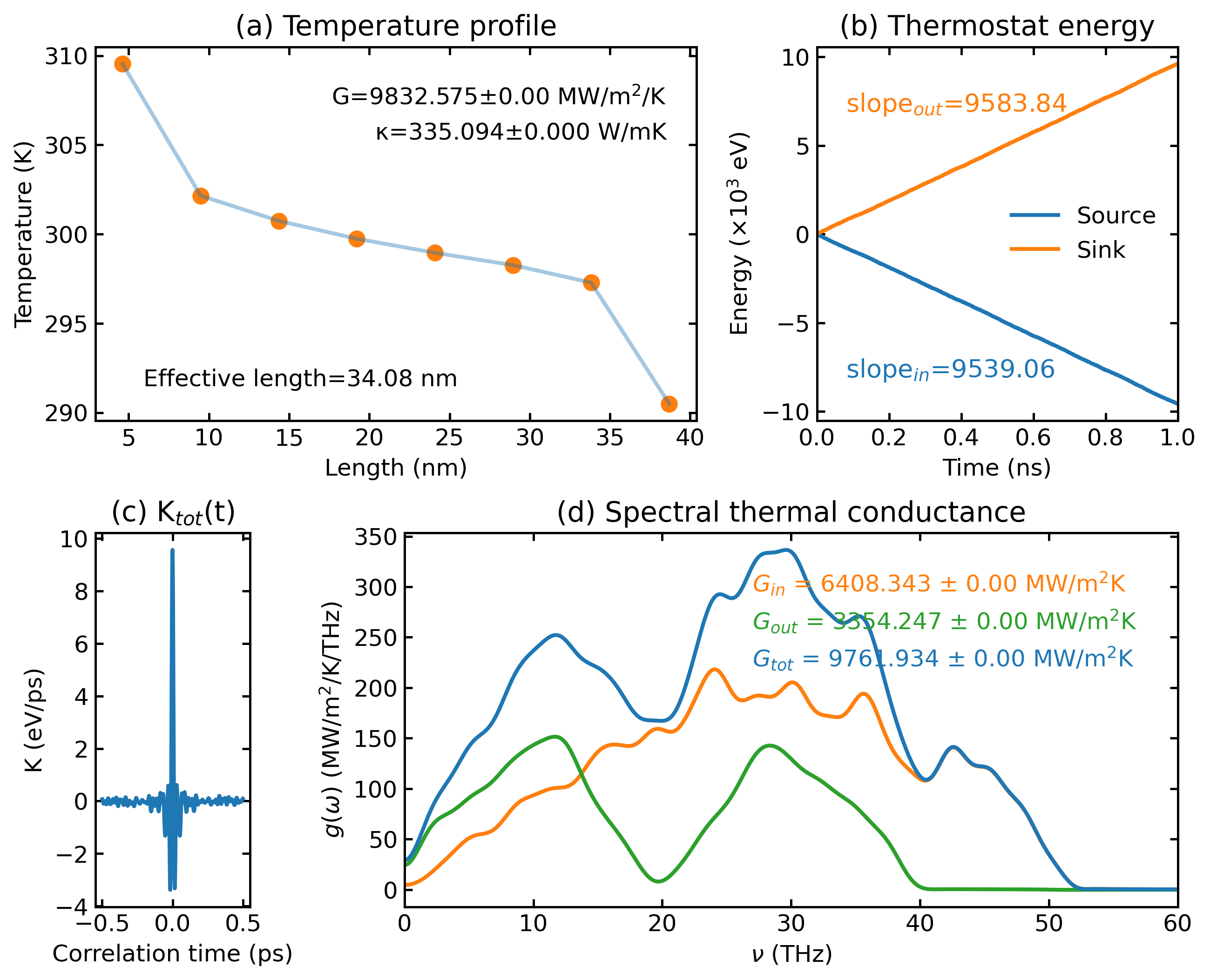
plt_nemd.py
Visualizes non-equilibrium molecular dynamics (NEMD) thermal transport properties.
Input Files: NEMD output files from GPUMD
Parameters:
| Parameter | Description |
|---|---|
real_length |
Real length of heat transfer zone in nm (set to Auto for auto-calculation) |
scale_eff_size |
Scale factor for effective cross-sectional area (default: 1). For 3D bulk: use 1. For low-dimensional systems with vacuum: S_box / S_eff |
cutoff_freq |
Cutoff frequency for SHC calculation in THz (default: 60) |
--save |
Optional, save the plot as nemd.png |
--save-data |
Optional, additionally export tab-separated data_nemd.txt and, when SHC data exist, data_shc.txt |
gpumdkit.sh -plt nemd [real_length] [scale_eff_size] [cutoff_freq] [--save] [--save-data]
gpumdkit.sh -plt nemd --save-data                         # use defaults and export data
gpumdkit.sh -plt nemd Auto 1 60 --save --save-data       # save the figure and data
The historical data_nemd.npz (and data_shc.npz when SHC data exist) are
still written as before. --save and --save-data are independent. The
legacy bare tokens save and save_data remain accepted.
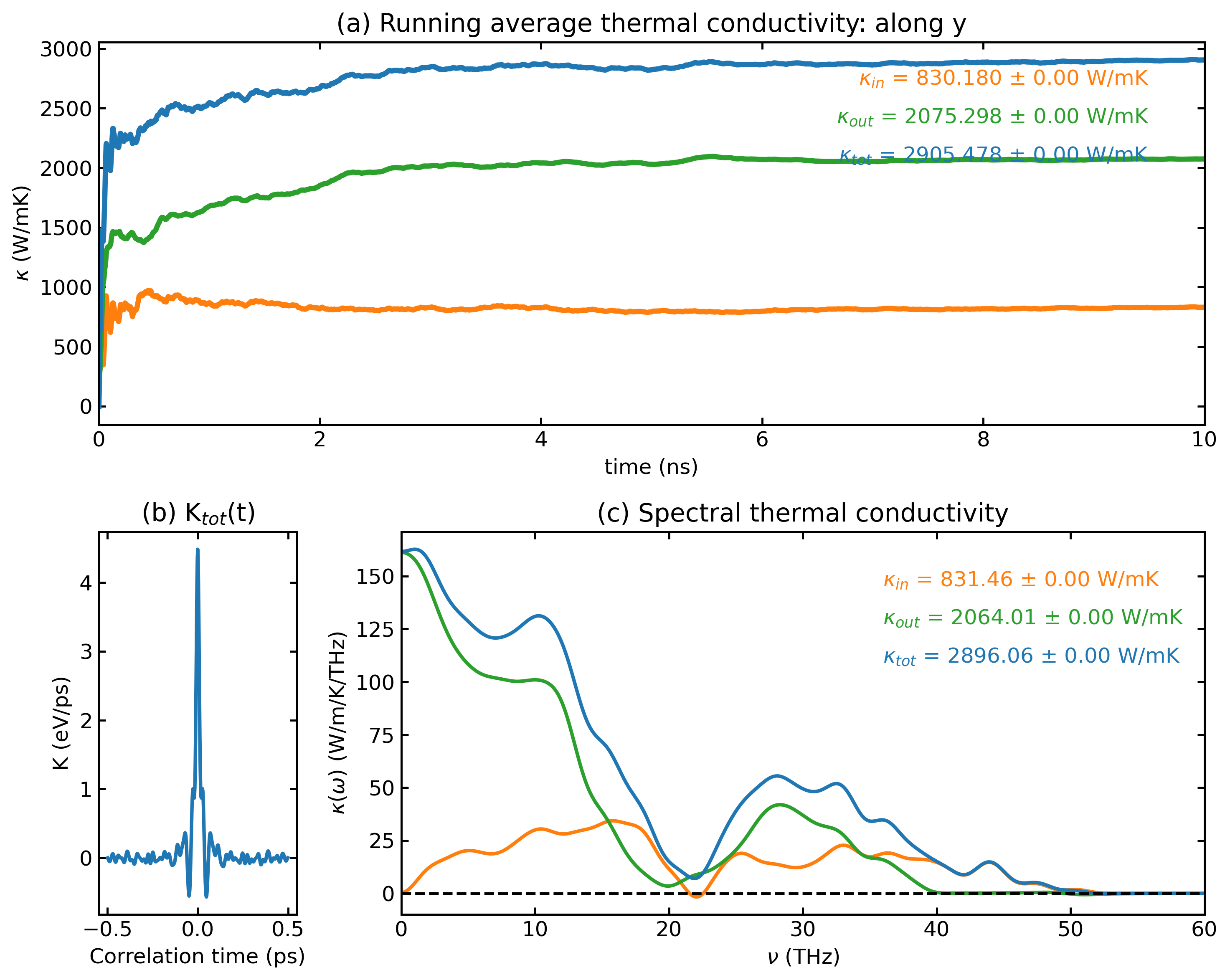
plt_hnemd.py
Plots homogeneous non-equilibrium molecular dynamics (HNEMD) results.
Input Files: HNEMD output files from GPUMD
Parameters:
| Parameter | Description |
|---|---|
scale_eff_size |
Scale factor for effective cross-sectional area (default: 1) |
cutoff_freq |
Cutoff frequency for SHC calculation in THz (default: 60) |
--save |
Optional, save the plot as hnemd.png |
--save-data |
Optional, save processed arrays as data_hnemd.npz and tab-separated data_hnemd.txt; when SHC data exist, also save data_shc.npz and data_shc.txt |
gpumdkit.sh -plt hnemd [scale_eff_size] [cutoff_freq] [--save] [--save-data]
gpumdkit.sh -plt hnemd --save-data             # use defaults and export data
gpumdkit.sh -plt hnemd 1 60 --save --save-data # save the figure and data
--save and --save-data are independent. The legacy bare tokens save and
save_data remain accepted.
plt_viscosity.py
Plots the stress autocorrelation and viscosity components from viscosity.out,
including diagonal and off-diagonal components.
Input Files: viscosity.out from the GPUMD viscosity calculation
Structural Analysis
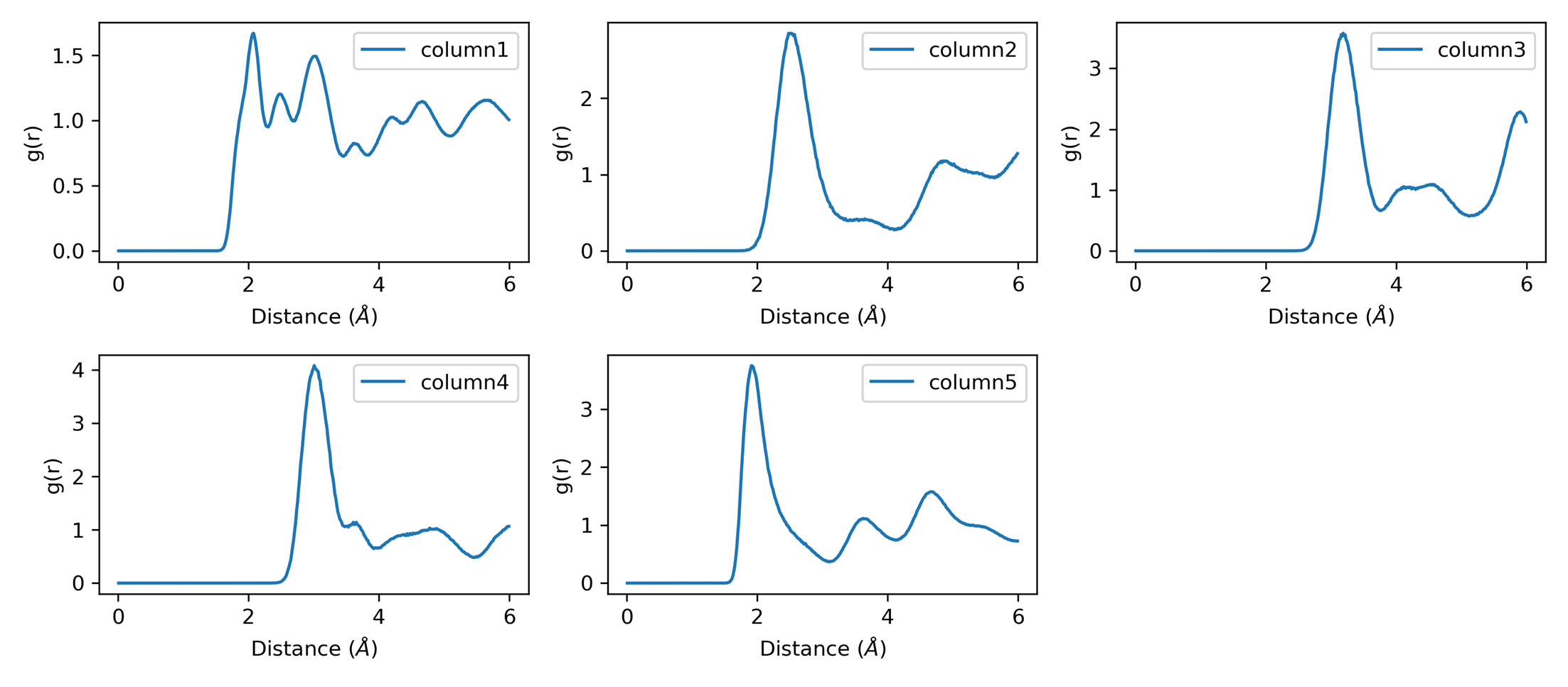
plt_rdf.py
Plots all RDF value columns in rdf.out (the radius column is used as the x-axis).
Input File: rdf.out
The rdf plotter does not select a single column. Use rdf_pmf when a
specific RDF output column is needed for PMF analysis.
RDF output:
plt_xrd.py
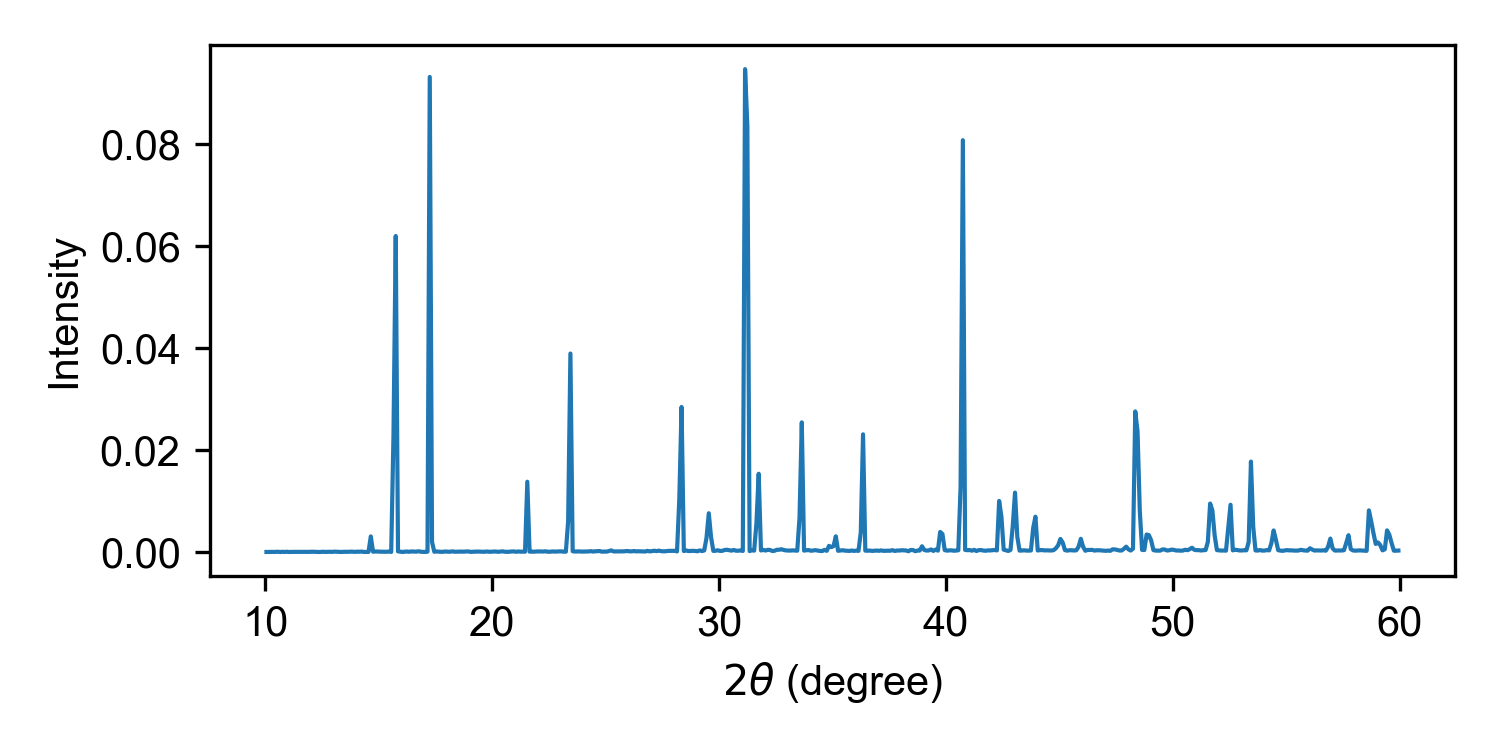
Plots the X-ray diffraction (XRD) output generated by calculator 413.
Input File: xrd.out by default; an alternative XRD output path can be
passed as the first argument.
The input file must be generated by calculator 413.
With save, the figure is written to xrd.png in the current working
directory.
Example:
plt_xrd_comp.py
Compares XRD curves from several temperature folders in the current working
directory. Each folder must be named <temperature>K and contain an
xrd.out file written by calculator 413. Curves are stacked from high
temperature at the top to low temperature at the bottom.
Generate each xrd.out with calculator 413 before running the comparison.
Run the comparison from the directory containing the *K subdirectories.
This command does not take a directory argument:
With save, the figure is written to xrd_comp.png in the current working
directory.
plt_rdf_pmf.py
Plots RDF combined with potential of mean force (PMF).
Input File: rdf.out
column_index selects an rdf.out output column: column 2 is the total RDF,
and columns 3 and above are pair RDFs.
plt_vac.py
Plots velocity autocorrelation function (VAC). Useful for analyzing phonon properties and atomic dynamics.
Input File: sdc.out written by GPUMD compute_sdc (the VAC columns are
read from this file by the plotting script). This is separate from the
msd.out input used by -plt sdc and -plt msd_sdc.
Output: Interactive plot or vac.png (with save option)
plt_cohesive.py
Plots cohesive energy curve from cohesive.out. Useful for analyzing lattice stability and equilibrium lattice constants.
Input File: cohesive.out (isotropic scaling factor vs cohesive energy)
Output: Interactive plot or cohesive.png (with save option)
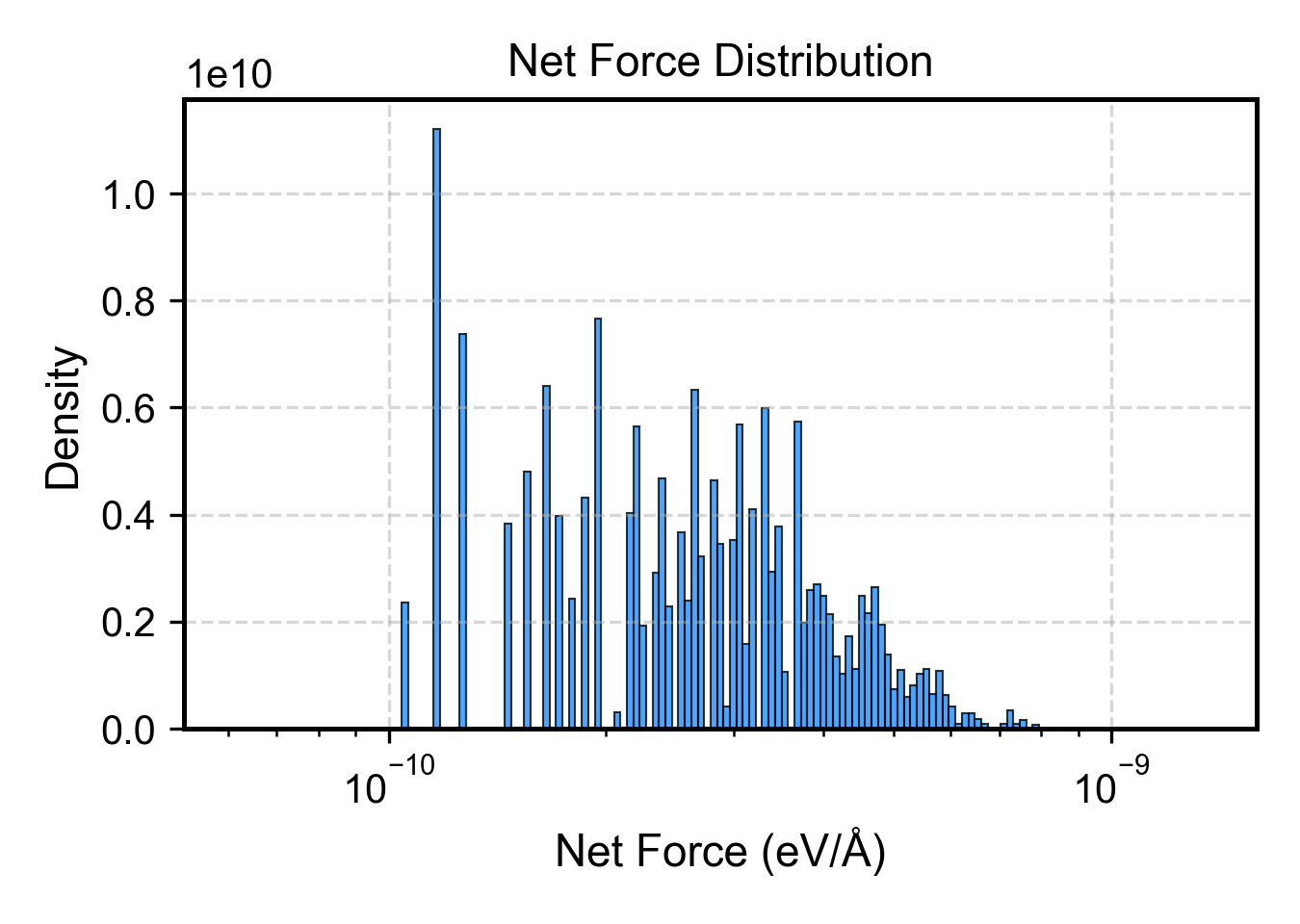
plt_net_force.py
Plots distribution of net forces on structures, useful for identifying problematic configurations.
Input File: train.xyz (extxyz format)
Reference: arXiv:2510.19774
Phonons
plt_phonon.py
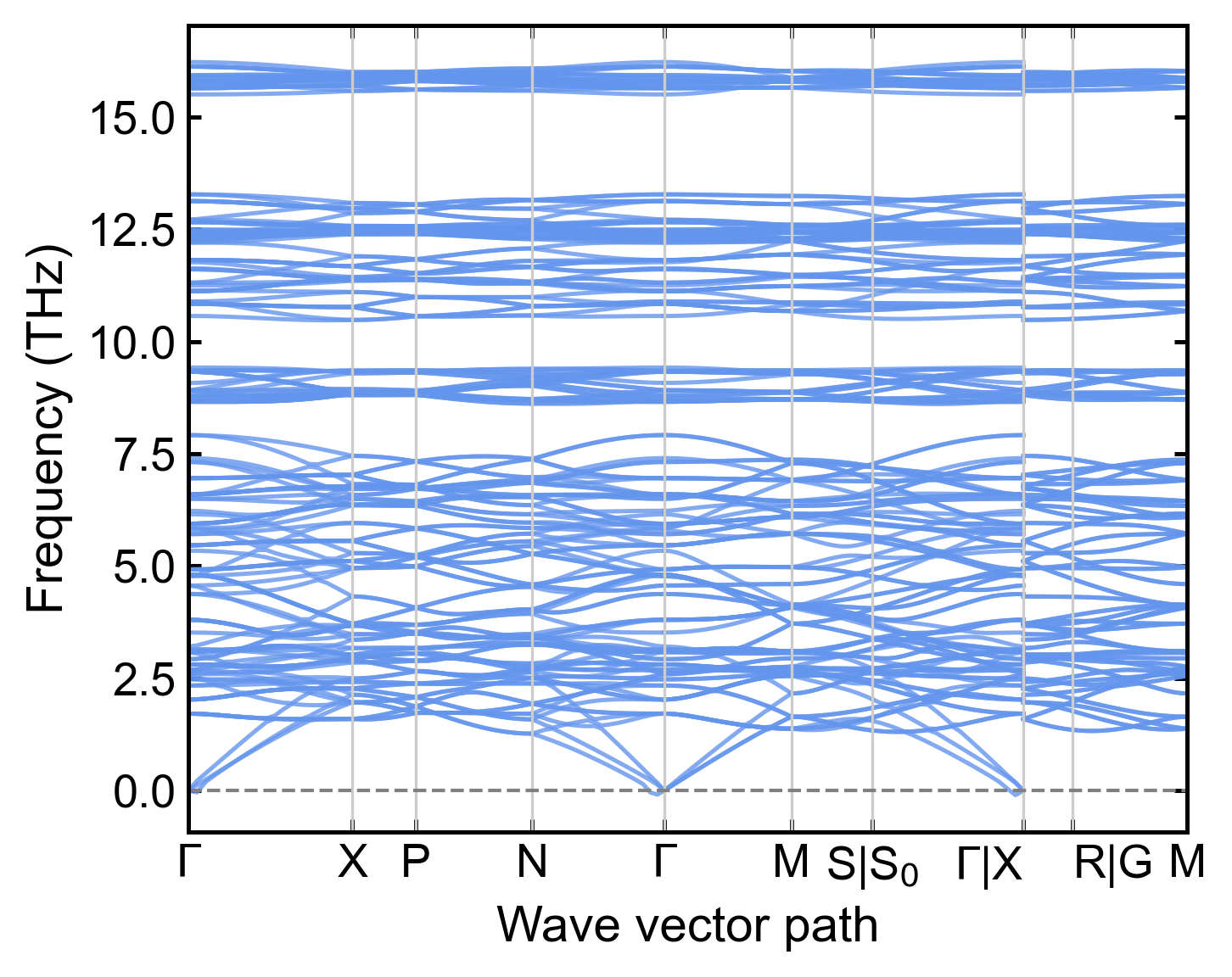
Plots a phonon band structure generated by calculator 414. The plotter reads
the q-point path and high-symmetry labels directly from a line-mode QPOINTS
file, so the path does not need to be repeated in the plotting script.
Input Files: A phonon data file (default phonon_NEP.dat) and QPOINTS
The calculation step is interactive:
The Python prompts accept a primitive-cell structure (default PRIMCELL.vasp),
a NEP model (default nep.txt), a line-mode path (default QPOINTS), the
supercell, the displacement amplitude, and the output name (default
phonon_NEP.dat). The calculation requires phonopy in addition to the
usual GPUMDkit/Calorine dependencies.
Plot the result with:
gpumdkit.sh -plt phonon
gpumdkit.sh -plt phonon phonon_DFT.dat
gpumdkit.sh -plt phonon phonon_NEP.dat QPOINTS save
The phonon data file is optional. If it is omitted, the plotter reads
phonon_NEP.dat; if only one file is supplied, the path file defaults to
QPOINTS.
Each disconnected q-path segment is drawn separately. Boundary labels such as
S|S₀ are combined at one horizontal position, and labels stay at one height
with lateral alignment used when neighboring labels are crowded.
plt_phonon_comp.py
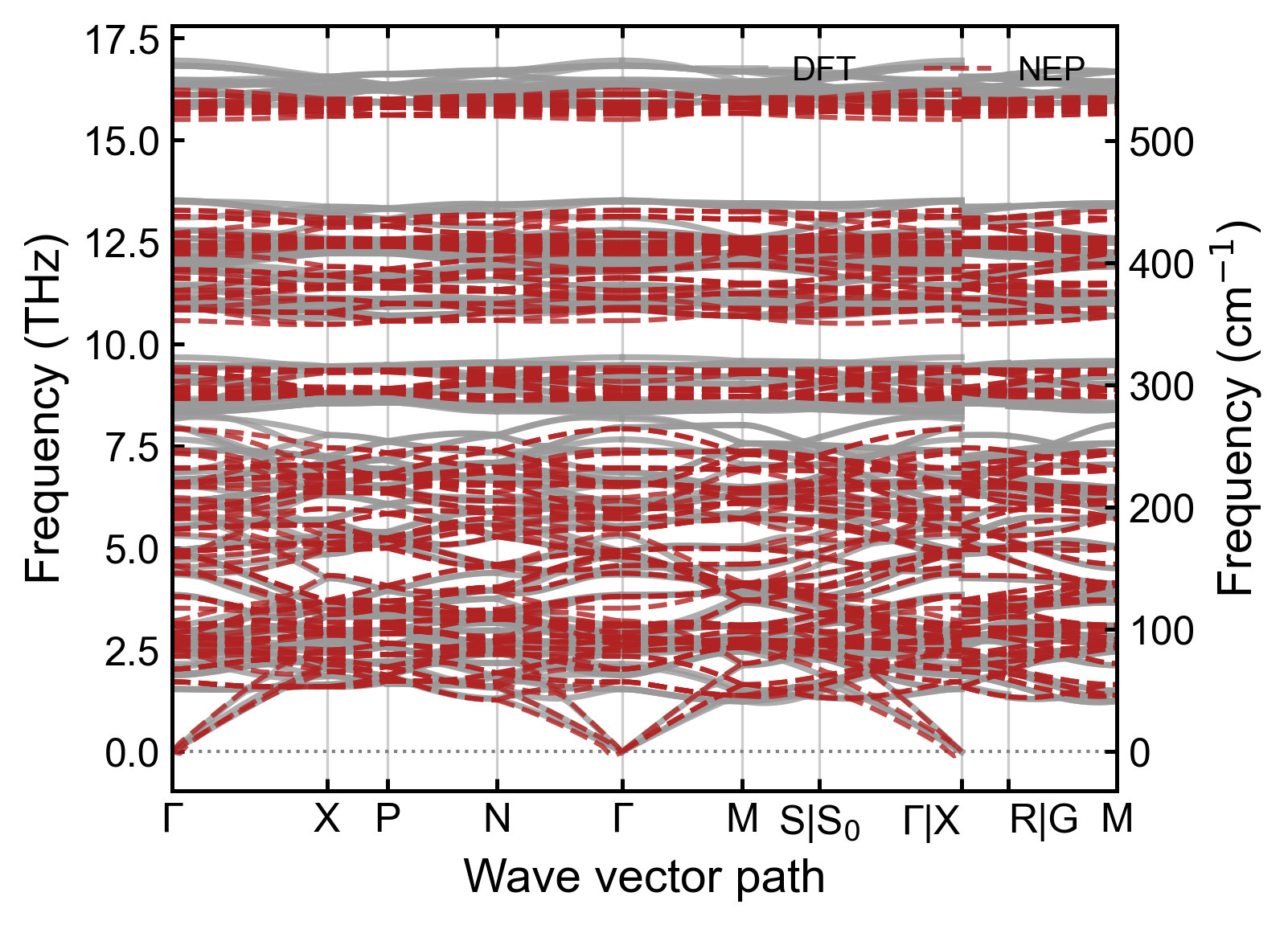
Compares two or more phonon band-structure files. The legend is inferred from
the filename: phonon_NEP.dat becomes NEP, phonon_DFT.dat becomes DFT,
and phonon_MACE.dat becomes MACE.
gpumdkit.sh -plt phonon_comp phonon_DFT.dat phonon_NEP.dat save
gpumdkit.sh -plt phonon_comp phonon_DFT.dat phonon_NEP.dat phonon_MACE.dat \
    --qpoints QPOINTS save
The default path file is QPOINTS; use --qpoints FILE for another path
definition. For two-file DFT/NEP comparisons, DFT is gray and solid while NEP
is firebrick and dashed. Additional models use the comparison palette and
distinct line styles. Disconnected path segments are normalized independently
before comparison, so files may use different offsets across a path jump. The
files must still contain the same q-point sampling and number of bands; matching
row counts alone are not sufficient.
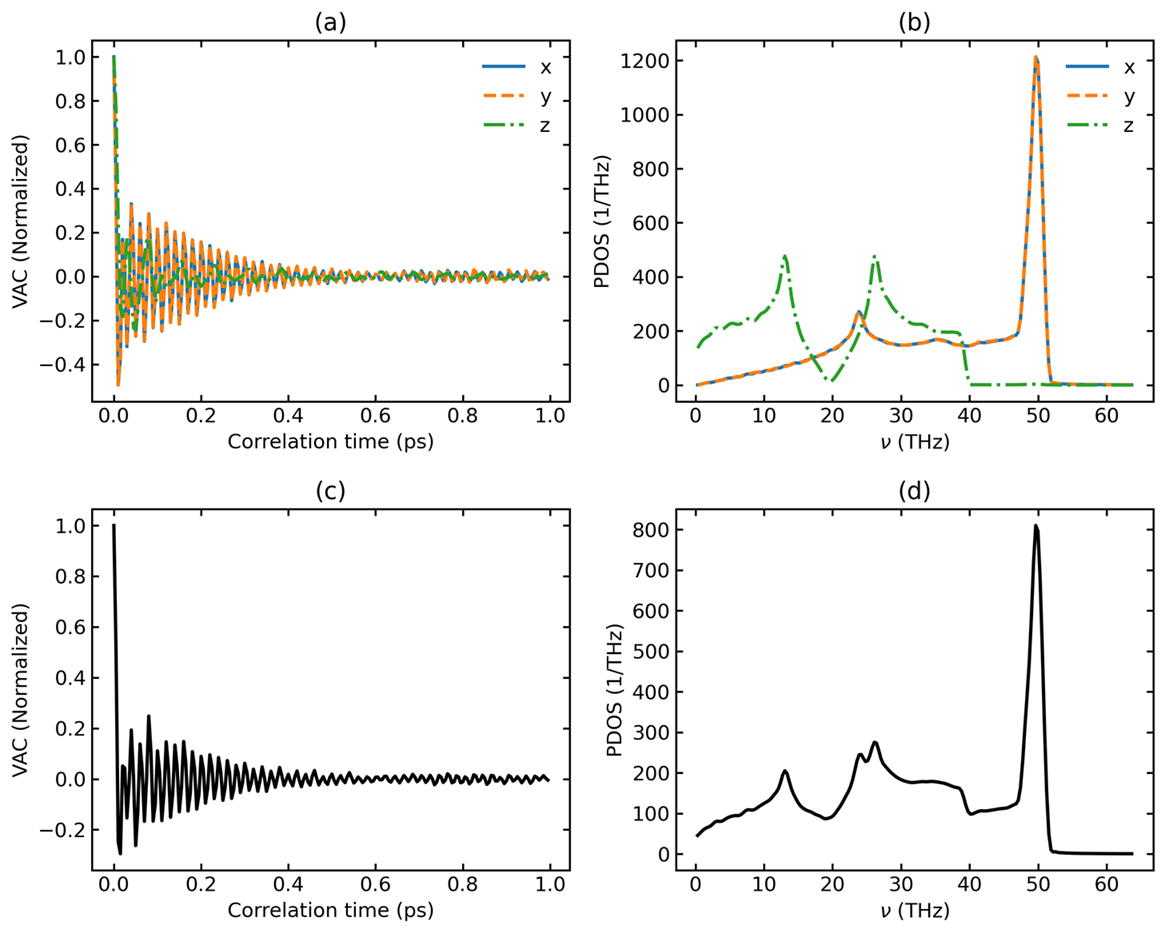
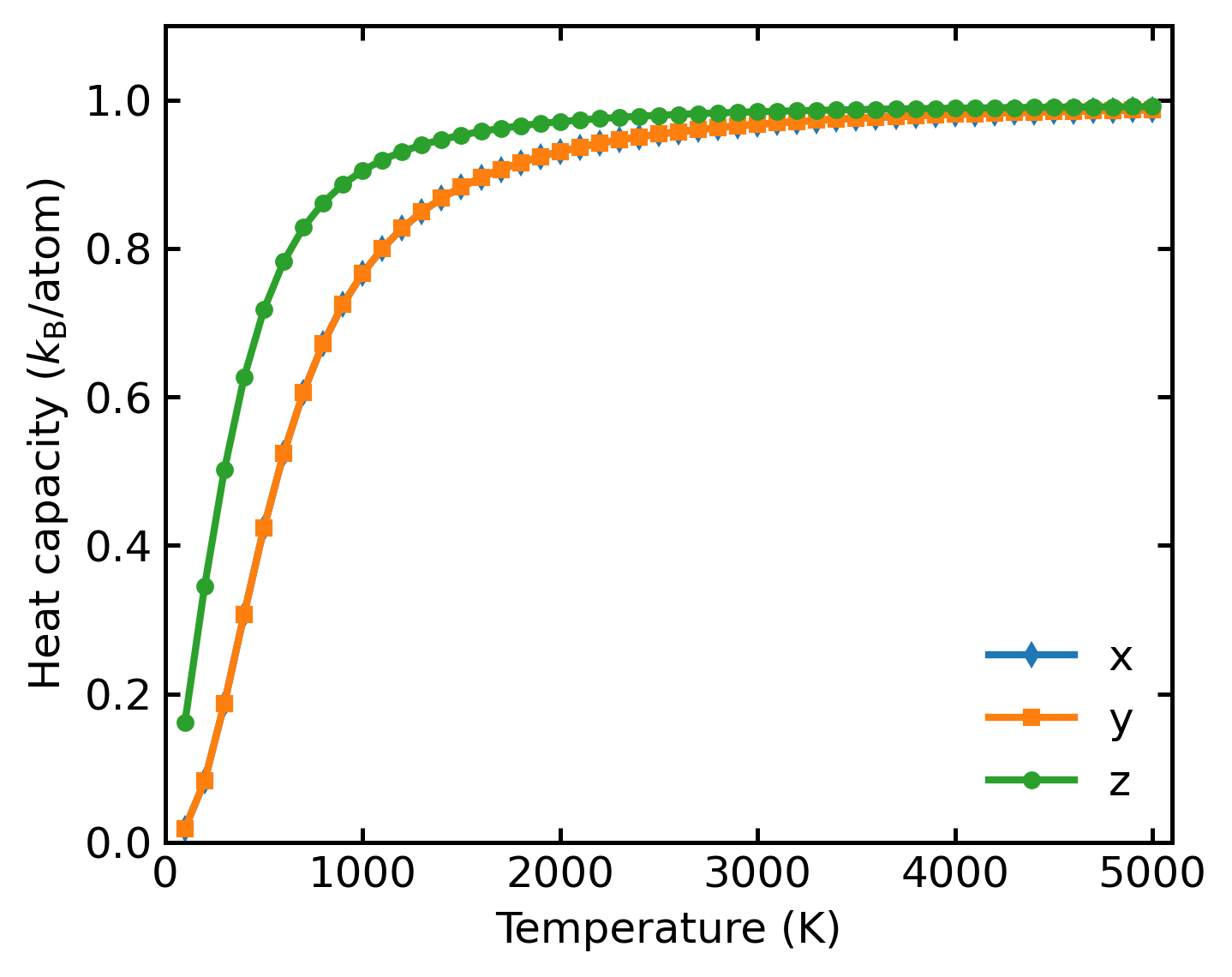
plt_pdos.py
Calculates and plots normalized VAC, PDOS, and Heat Capacity (Cv).
Input Files: model.xyz, run.in, dos.out, mvac.out
Heat capacity output:
Descriptor, Dimer, and Extra Analysis
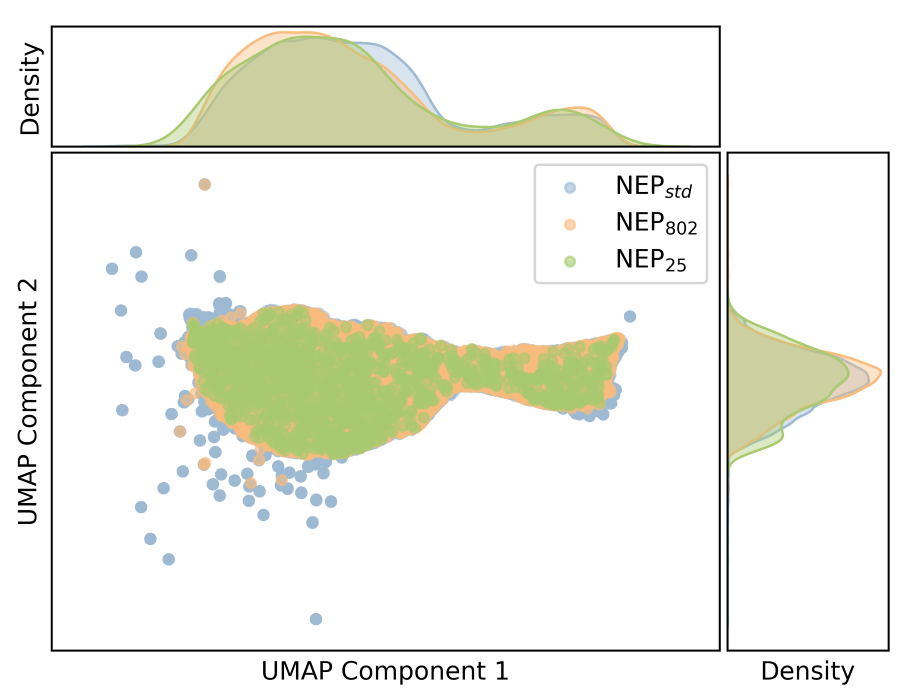
plt_descriptors.py
Visualizes high-dimensional NEP descriptors using dimensionality reduction (PCA or UMAP).
Input File: descriptors.npy (generated by gpumdkit.sh -calc des)
Methods:
- pca — Principal Component Analysis
- umap — Uniform Manifold Approximation and Projection
# First generate descriptors
gpumdkit.sh -calc des train.xyz descriptors.npy nep.txt Li

# Then visualize
gpumdkit.sh -plt des pca descriptors.npy
gpumdkit.sh -plt des umap descriptors.npy
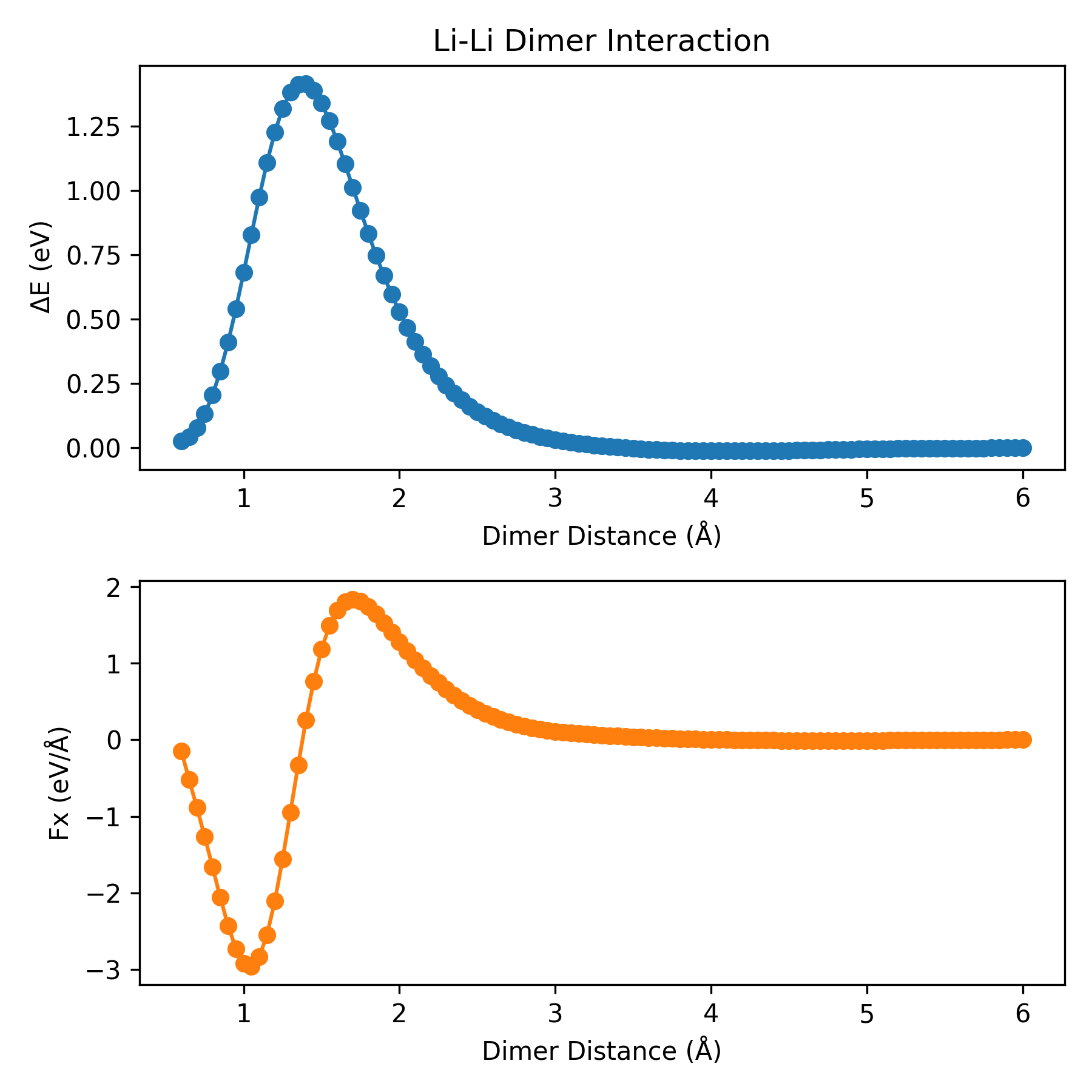
plt_dimer.py
Plots dimer interaction curves. Two atoms are placed in a cubic box (30 Å) and the potential energy and force are calculated as a function of dimer distance using a NEP model.
Input File: nep.txt
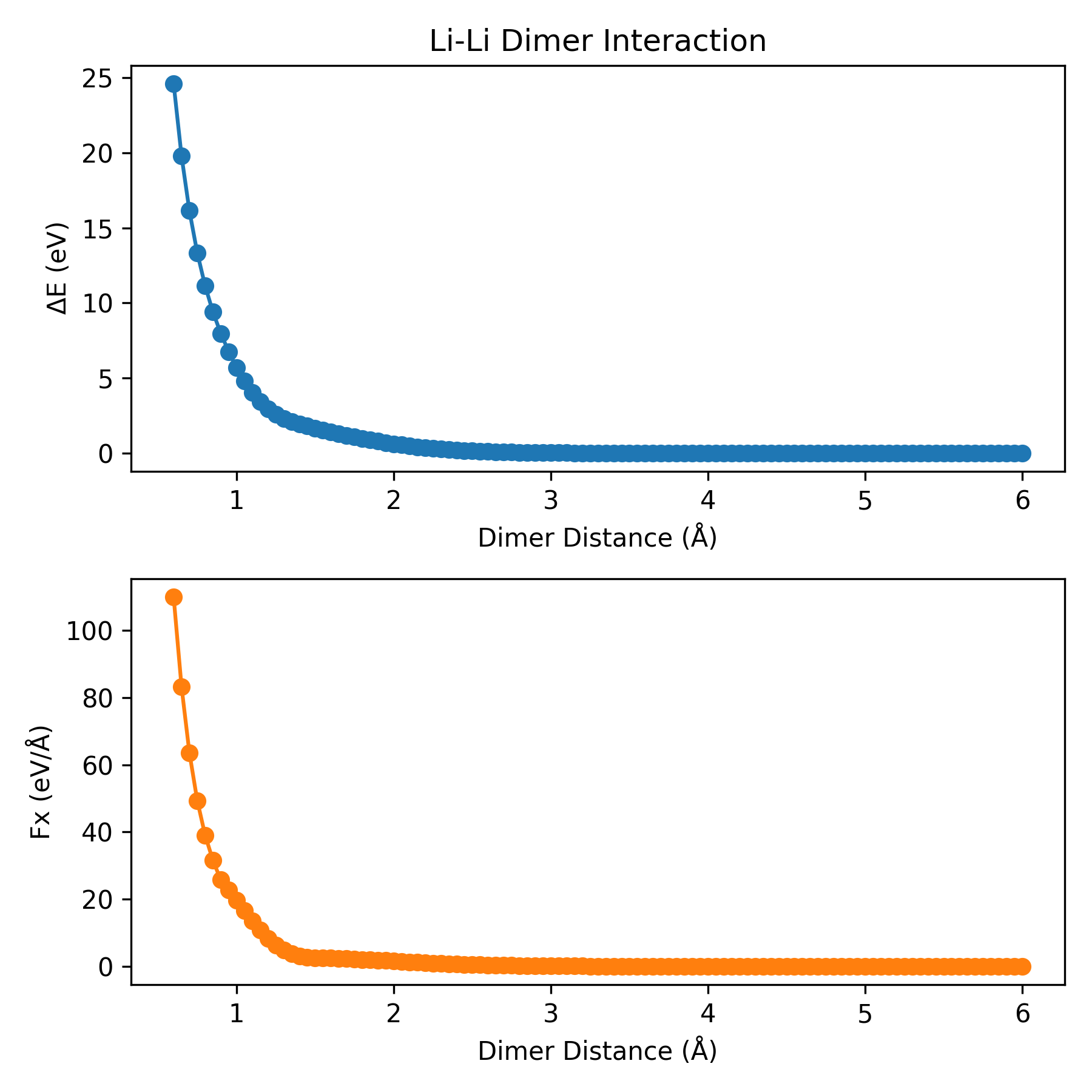
Reference: J. Chem. Inf. Model. 2026, 66, 3, 1406-1413
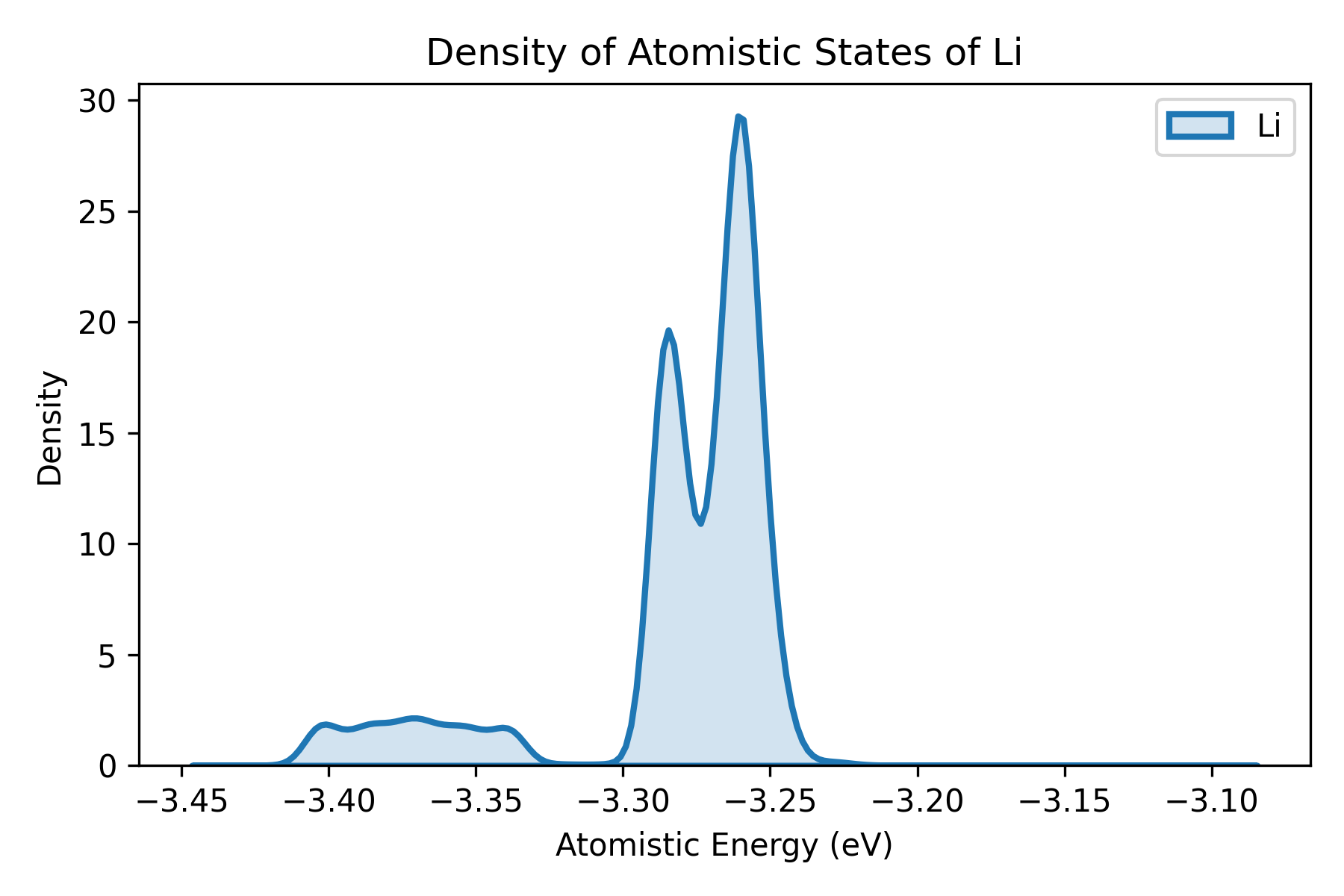
plt_doas.py
Plots density of atomistic states (DOAS) proposed by Wang et al..
Input File: doas.out (calculated by gpumdkit.sh -calc doas)
Plane-Grid Plot for Polar Materials
This workflow maps displacement or polarization data onto a grid and plots selected plane profiles. For detailed usage and real-world examples, see Polar Material Analysis.
Dependency:
Typical upstream steps:
gpumdkit.sh -calc nlist -i model.xyz -c 4 -n 12 -C Pb Sr -E O
gpumdkit.sh -calc disp -i movie.xyz -n nl-Pb_Sr-O.dat -o displacements.dat
gpumdkit.sh -calc avg-struct -i movie.xyz -l 0.2 -o averaged_structure.xyz
Usage:
gpumdkit.sh -plt plane-grid -i averaged_structure.xyz -d displacements.dat -e Pb Sr
gpumdkit.sh -plt plane-grid -i averaged_structure.xyz -d displacements.dat -e Pb Sr --select-xy 0 1
Quick Reference Table
| Command | Input File(s) | Description |
|---|---|---|
train |
loss.out, *_train.out |
NEP training plots |
prediction / test |
*_train.out |
NEP prediction-mode parity plots for train.xyz |
train_test |
*_train.out, *_test.out |
Combined parity plots |
parity_density |
*_train.out |
Density-based parity plots |
train_density |
*_train.out |
Density-based training parity plots (stress preferred over virial) |
force_errors |
force_train.out |
Force error metrics |
restart |
nep.restart |
Restart file parameters |
charge |
train.xyz, charge_train.out |
Charge distribution |
born_charge / bec |
bec_train.out, optional bec_test.out |
Born effective charges |
thermo |
thermo.out |
Thermodynamic properties |
thermo2 / thermo3 |
thermo.out |
Thermodynamic plots in alternative styles |
msd |
four-column msd.out from -calc msd, or first four columns of GPUMD compute_msd output |
Mean square displacement |
msd_all |
msd.out (all_groups) |
MSD for all species |
msd_conv |
msd_step*.out |
MSD convergence check |
sdc |
single-group seven-column msd.out from GPUMD compute_msd |
Self-diffusion coefficient |
msd_sdc |
single-group seven-column msd.out from GPUMD compute_msd |
MSD and SDC combined |
arrhenius_d / D |
*K/msd.out |
Arrhenius diffusivity |
arrhenius_sigma / sigma |
*K/{thermo.out, msd.out} plus first-directory model.xyz and optional run.in |
Arrhenius ionic conductivity |
D_PT |
*K/msd.out plus a transition temperature |
Piecewise Arrhenius diffusivity around a phase transition |
sigma_PT |
*K/{thermo.out, msd.out} plus first-directory model.xyz, optional run.in, and a transition temperature |
Piecewise Arrhenius ionic conductivity around a phase transition |
D_xyz |
*K/msd.out |
Directional Arrhenius diffusivity (x/y/z) |
sigma_xyz |
*K/{thermo.out, msd.out} plus first-directory model.xyz |
Directional Arrhenius ionic conductivity (x/y/z) |
rdf |
rdf.out |
Radial distribution function |
rdf_pmf |
rdf.out |
RDF + potential of mean force |
xrd |
xrd.out |
X-ray diffraction intensity |
xrd_comp |
*K/xrd.out |
XRD comparison across temperatures |
vac |
sdc.out |
Velocity autocorrelation |
cohesive |
cohesive.out |
Cohesive energy curve |
net_force |
train.xyz |
Net force distribution |
doas |
doas.out |
Density of atomistic states |
des |
descriptors.npy |
Descriptor PCA/UMAP |
dimer |
nep.txt |
Dimer energy/force curve |
pdos |
model.xyz, run.in, dos.out, mvac.out |
VAC and PDOS |
phonon |
phonopy band-structure data | Phonon band structure |
phonon_comp |
phonopy band-structure data | Compare phonon band structures |
emd |
EMD outputs | EMD thermal conductivity in one direction |
emd2 |
EMD outputs | EMD thermal conductivity in all directions |
nemd |
NEMD outputs | NEMD thermal transport |
hnemd |
HNEMD outputs | HNEMD thermal transport |
viscosity |
viscosity.out |
Stress autocorrelation and viscosity components |
plane-grid |
model.xyz, displacements.dat |
Displacement plane grid profiles |