🔍 Analyzer Scripts
Analyzer scripts provide structure statistics, distance checks, filters, composition analysis, outlier detection, and time estimation for extxyz datasets.
What it does
This module helps you inspect, filter, and validate structure datasets. You can check composition, analyze property ranges, detect short contacts, filter structures by various criteria, find outliers in NEP training data, and estimate remaining simulation time.
Before you start
Script location: Scripts/analyzer/
Make sure GPUMDkit is installed. See Quick Start for installation instructions.
Overview
| Task | Command | Purpose |
|---|---|---|
| Composition | gpumdkit.sh -analyze_comp train.xyz |
Group structures by chemical composition |
| Chemical species | gpumdkit.sh -chem_species train.xyz |
List species in a file |
| Property range | gpumdkit.sh -range train.xyz force |
Inspect energy/force/virial range |
| Energy reference shifting | gpumdkit.sh -shift_energy |
Interactively shift extxyz energy references |
| Minimum distance | gpumdkit.sh -min_dist dump.xyz |
Fast distance check without PBC |
| Minimum distance with PBC | gpumdkit.sh -min_dist_pbc dump.xyz |
Accurate distance check with PBC |
| Charge balance | gpumdkit.sh -cbc train.xyz |
Oxidation-state balance check |
| Distance filter | gpumdkit.sh -filter_dist_pbc dump.xyz 1.0 |
Remove structures with short contacts |
| Box filter | gpumdkit.sh -filter_box dump.xyz 13 |
Remove structures with too-large box edges |
| Property filter | gpumdkit.sh -filter_value train.xyz force 20 |
Filter by energy/force/virial threshold |
| Pair-distance range | gpumdkit.sh -filter_range dump.xyz Li Li 1.8 2.0 |
Extract structures by pair distance |
| Outlier detection | Menu 502 | Find high-RMSE structures in training set |
| Probability density | gpumdkit.sh -pda <ref> <traj> <element> <interval> |
3D probability density for diffusion channels |
| GPUMD time | gpumdkit.sh -time gpumd |
Estimate remaining GPUMD run time |
| WPE GPUMD time | gpumdkit.sh -time wpe |
Estimate remaining time for WPE-enabled GPUMD runs |
| NEP time | gpumdkit.sh -time nep |
Estimate remaining NEP training time |
Choose checks before filters
Run a non-destructive check before a filtering command whenever possible. This keeps the reason for excluding structures visible in the terminal output.
| Question | First command | What remains your decision |
|---|---|---|
| Are periodic images relevant? | gpumdkit.sh -min_dist_pbc <input.xyz> |
Use the PBC-aware route for periodic cells; the non-PBC route is only a fast comparison. |
| Is a value unusually large or small? | gpumdkit.sh -range <input.xyz> energy\|force\|virial |
The acceptable range depends on the target system and reference data. |
| Are contacts too short? | gpumdkit.sh -min_dist_pbc <input.xyz> |
Choose a distance threshold from the chemistry and purpose of the dataset. |
| Which structures should be removed? | inspect the check result first, then -filter_* |
Filtering thresholds are not universal defaults. |
Numbers in the examples below demonstrate command syntax only. Do not treat a distance, box-edge, or force cutoff shown in an example as a recommended value for another material or workflow.
Interactive Mode
Open GPUMDkit and choose 5) Analyzer:
The analyzer menu is:
+------------------------------------------------------+
|                    ANALYZER TOOLS                    |
+------------------------------------------------------+
| 501) Analyze composition of extxyz                   |
| 502) Find outliers of extxyz                         |
| 503) Analyze chemical species of extxyz              |
| 504) Check charge balance of extxyz                  |
| 505) Analyze energy/force/virial range               |
| 506) Filter structures by minimum distance           |
| 507) Get minimum interatomic distance                |
| 508) Probability density analysis                    |
| 509) Shift energy reference interactively            |
+------------------------------------------------------+
| 000) Return to the main menu                         |
+------------------------------------------------------+
Input the function number:
Most analyzer functions also have direct CLI shortcuts, which are listed in the overview table and in the sections below.
Composition Analysis
analyze_composition.py analyzes the composition of your extxyz file and lets you export subsets.
What it does: Groups structures by chemical composition and shows how many structures belong to each composition. You can export subsets by composition.
CLI mode:
Interactive mode: Choose 501 from the analyzer menu.
Output example:
Index    Compositions           N atoms      Count
---------------------------------------------------
1        Li56O96Zr16La24        192          51
---------------------------------------------------
Enter index to export (e.g., '1,2', '2-3', 'all'), or press Enter to skip:
This is useful when train.xyz contains structures from different systems or different cell sizes. You can export a subset by composition from the interactive prompt.
Chemical Species
analyze_chem_species.py lists all unique chemical species in an extxyz file.
Input file: train.xyz (extxyz format)
Property Range Analysis
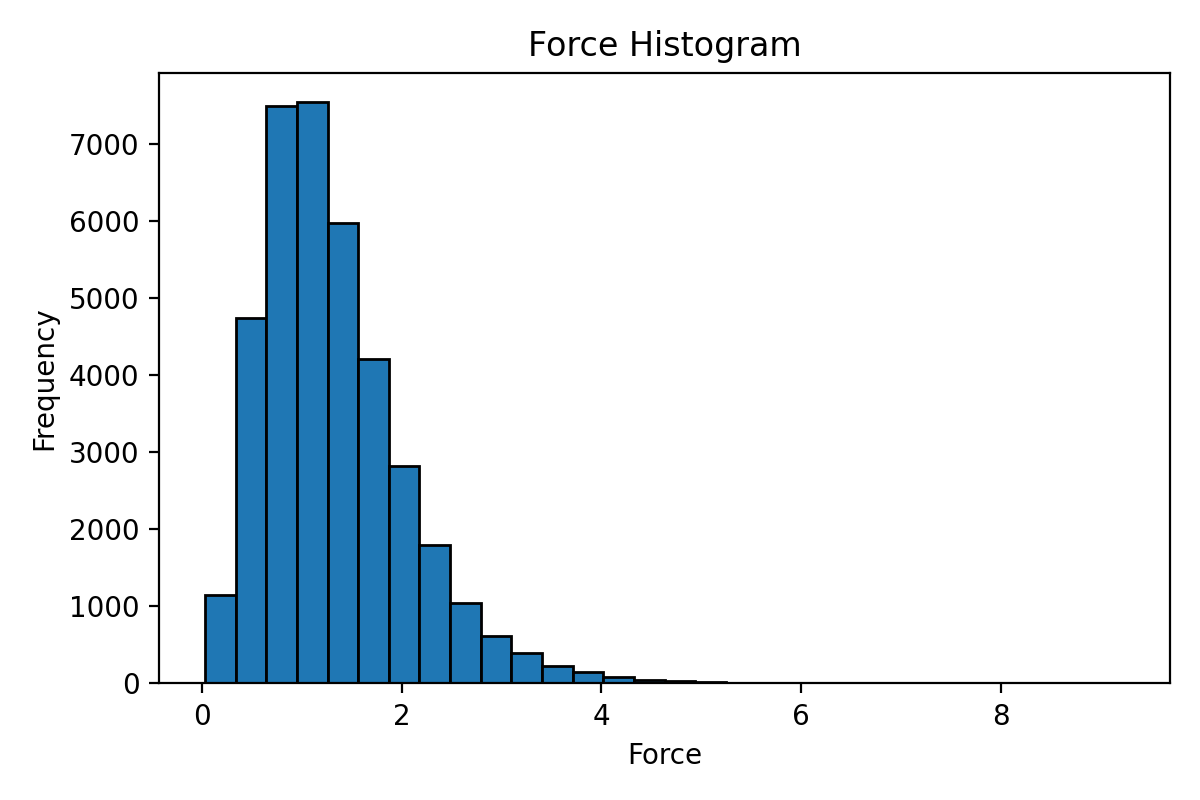
energy_force_virial_analyzer.py calculates and visualizes the range of properties from an extxyz file.
Input file: train.xyz (extxyz format)
Supported properties: energy, force, virial
gpumdkit.sh -range train.xyz force
gpumdkit.sh -range train.xyz energy
gpumdkit.sh -range train.xyz virial
gpumdkit.sh -range train.xyz force hist    # Show histogram
Output example:
With hist option:
Energy Reference Shifting
align_energy_reference.py interactively shifts the energy= values in a
multi-frame extxyz file. Atom lines and all other header fields are copied to
the output file unchanged.
Start the interface directly:
Or choose 5) Analyzer -> 509 from the main menu. The interface first shows
the detected elements and config_type groups, then offers three modes:
- Reference-group alignment: align selected groups to the mean energy of a reference group.
- Zero atomic baseline alignment: optimize a baseline for each group so its shifted energies target zero.
- DFT-to-NEP alignment: calculate NEP energies and align the original DFT energies to them.
The existing NES defaults are retained. Advanced NES settings can be changed
inside the Python interface when needed. The DFT-to-NEP mode requires the
calorine package and a compatible NEP model file.
Minimum Distance Checks
Without PBC (Fast)
get_min_dist.py calculates minimum interatomic distances without considering periodic boundary conditions. Fast but may be inaccurate for periodic systems.
What it does: Reports the minimum distance for each element pair across all frames, ignoring periodic boundary conditions. Elements are collected from the entire dataset in first-appearance order; pairs absent from a frame are skipped. The PBC version follows the same element-pair coverage.
CLI mode:
Interactive mode: Choose 507 from the analyzer menu.
Output example:
+---------------------------+
|   PBC ignored for speed   |
| use -min_dist_pbc for PBC |
+---------------------------+
Minimum interatomic distances:
+---------------------------+
| Atom Pair |  Distance (Å) |
+---------------------------+
|   Li-Li   |     1.696     |
|   Li-O    |     1.587     |
|   O-O     |     2.480     |
+---------------------------+
Overall min_distance: 1.587 Å
Notes: Use this for a quick check. For periodic systems, prefer -min_dist_pbc for accurate results.
With PBC (Accurate)
get_min_dist_pbc.py calculates minimum interatomic distances considering periodic boundary conditions.
What it does: Reports the minimum distance between each pair of elements, accounting for periodic boundary conditions.
CLI mode:
Interactive mode: Choose 507 from the analyzer menu and answer y when asked whether to consider PBC.
Output example:
Minimum interatomic distances (with PBC):
+---------------------------+
| Atom Pair |  Distance (Å) |
+---------------------------+
|   Li-Li   |     1.696     |
|   Li-O    |     1.587     |
|   O-O     |     2.355     |
+---------------------------+
Overall min_distance: 1.587 Å
Filtering Structures
Filter by Minimum Distance
filter_structures_by_distance_pbc.py removes structures with any interatomic distance below a threshold.
Input file: dump.xyz (extxyz format)
This removes structures with any interatomic distance below 1.0 Å.
Filter by Box Size
filter_exyz_by_box.py filters structures by box-edge length.
Input file: dump.xyz (extxyz format)
This keeps structures where all box edges are below 13 Å.
Filter by Property Value
filter_exyz_by_value.py filters structures by energy, force, or virial threshold.
Input file: train.xyz (extxyz format)
Supported properties: energy, force, virial
This filters out structures with force components exceeding 20 eV/Å (or energy exceeding 5 eV/atom).
Filter by Pair-Distance Range
filter_dist_range.py extracts structures where a specific element-pair distance falls within a given range.
Input file: dump.xyz (extxyz format)
This extracts structures where the Li-Li minimum distance is between 1.8 Å and 2.0 Å. Output: filtered_Li_Li_1.8_2.0.xyz.
Charge Balance Check
charge_balance_check.py checks the oxidation-state balance of structures.
Input file: train.xyz (extxyz format)
Output files:
balanced.xyz— structures with balanced chargesunbalanced.xyz— structures with unbalanced chargesindices.txt— indices of balanced structures
This is intended for systems where common oxidation states are meaningful.
Outlier Detection
find_outliers.py finds outlier structures in NEP training data based on RMSE thresholds for energy, force, and stress.
Input files: energy_train.out, force_train.out, stress_train.out, train.xyz
These files are generated during NEP training. The script compares DFT vs NEP predictions and identifies structures with large errors.
Structures with a -1e6 missing-stress marker or a stress component whose absolute value exceeds 1e6 are excluded before RMSE calculation and are not written to either output dataset. If no valid structures remain, the script reports an error without writing outputs.
Interactive prompts:
Enter energy RMSE threshold (meV/atom): 1
Enter force RMSE threshold (meV/Å): 60
Enter stress RMSE threshold (GPa): 0.03
Output files:
selected.xyz— structures exceeding the RMSE thresholds (outliers)remained.xyz— structures within the thresholdsselected_remained.png— comparison plot
Use case: After NEP training, use this to identify problematic structures that contribute most to the error. Remove or improve these structures to enhance the training set.
Time Estimation
GPUMD Remaining Time
time_consuming_gpumd.sh estimates the remaining time for a GPUMD simulation.
Input files: run.in, thermo.out (in the current GPUMD working directory)
Output example:
----------------- System Information ----------------
total frames: 1050000
-----------------------------------------------------
Current Frame  Speed (steps/s)   Total Time       Time Left       Estimated End
-------------   -------------   -------------   -------------   -----------------
    13000          499.86         0h 35m 0s      0h 34m 34s    2025-12-27 18:12:04
    14000          199.93        1h 27m 31s      1h 26m 21s    2025-12-27 19:03:56
WPE-Enabled GPUMD Remaining Time
time_consuming_wpe.sh estimates the remaining time for WPE-enabled GPUMD runs using buffered progress updates.
Input files: run.in and neighbor.out or thermo.out (in the current GPUMD working directory)
NEP Remaining Time
time_consuming_nep.sh estimates the remaining time for NEP training.
Input files: loss.out (in the current NEP working directory)
Output example:
+-----------------+-----------+-----------------+---------------------+
|       Step      | Time Diff |    Time Left    |    Finish Time      |
+-----------------+-----------+-----------------+---------------------+
| 6700            | 1 s       | 0 h 15 m 33 s   | 2025-10-23 15:34:11 |
| 6800            | 2 s       | 0 h 31 m 4 s    | 2025-10-23 15:49:44 |
| 6900            | 2 s       | 0 h 31 m 2 s    | 2025-10-23 15:49:44 |
+-----------------+-----------+-----------------+---------------------+
Probability Density Analysis
probability_density_analysis.py calculates 3D probability density of mobile ions for diffusion channel analysis.
Input files: Reference structure (POSCAR), trajectory file (extxyz)
CLI mode:
Arguments:
| Argument | Meaning |
|---|---|
LLZO.vasp |
Reference structure (POSCAR format) |
dump.xyz |
Trajectory file (extxyz format) |
Li |
Target mobile species |
0.25 |
Grid interval for the probability density (Å) |
Output: probability_density_0.25.vasp — probability density grid in VASP format for visualization with VESTA or similar tools.
Visualization suggestions:
- Open
probability_density_0.25.vaspin VESTA - Use "Edit → Data → Volumetric Data" to adjust isosurface levels
- Color the probability density by value to highlight preferred diffusion pathways
- Overlay with the crystal structure for context
Example Workflows
Structure Quality Check
# 1. Check composition
gpumdkit.sh -analyze_comp train.xyz

# 2. Check energy/force range
gpumdkit.sh -range train.xyz force hist

# 3. Check minimum distances
gpumdkit.sh -min_dist_pbc train.xyz

# 4. Find outliers (after NEP training)
# Interactive: 5) Analyzer → 502
Structure Filtering Pipeline
# 1. Filter by minimum distance (writes filtered_dump.xyz)
gpumdkit.sh -filter_dist_pbc dump.xyz 1.0

# 2. Filter by box size (writes filtered_by_box.xyz)
gpumdkit.sh -filter_box filtered_dump.xyz 13

# 3. Filter by force threshold (writes filtered.xyz)
gpumdkit.sh -filter_value filtered_by_box.xyz force 20